Web Care Plans: Build, Price, and Sell Recurring Revenue

So, what exactly is a web care plan? Think of it as an ongoing service package designed to keep a client's website secure, updated, and running smoothly long after it goes live. It bundles all those critical maintenance tasks—like backups, security scans, and software updates—into a simple monthly retainer. This completely changes the game, turning a one-off project into a long-term, valuable partnership.

Why Web Care Plans Are Your Agency's Growth Engine

Most agencies know the feeling all too well: the project rollercoaster. You land a big build, work flat out for a few months, and then hit an income cliff while you scramble for the next client. This feast-or-famine cycle is more than just stressful; it's a massive roadblock to building a sustainable business. Web care plans are the answer, creating a solid foundation of predictable, recurring revenue that can revolutionise your agency's financial stability.
Three colleagues collaborating and reviewing business data on a laptop during a team meeting.

The most successful Australian agencies I've seen have figured out that these plans are much more than a simple maintenance checklist. They’re a strategic move. By staying involved with a client's website post-launch, you evolve from being just another vendor into an essential digital partner they can't live without.

From One-Off Projects to Predictable Profits

Let’s picture two agencies. Agency A finishes a site, hands over the login details, and simply hopes the client remembers them down the track. Their income is sporadic and impossible to forecast.

Now, consider Agency B. They successfully sign 80% of their project clients onto a web care plan. Suddenly, they have a reliable monthly revenue stream that covers the bills, frees them up to make strategic hires, and gives them capital to invest back into the business.

That stability is a huge win, but the benefits run much deeper.

  • Preserve Your Portfolio: Let's be honest, a website without proper maintenance starts to fall apart. It gets slow, becomes a target for hackers, and eventually becomes a poor reflection on the agency that built it. Care plans are your insurance policy, protecting your hard work and keeping your portfolio looking sharp.
  • Proactive Problem Solving: You become the hero who fixes problems before the client even notices them. That dodgy plugin update or new security threat? You handle it quietly behind the scenes, reinforcing just how valuable you are.
  • Enhanced Client Trust: Nothing builds trust like consistency. Regular monthly reports and always-on support show you’re invested in their success. When a client knows you're looking after their most important digital asset, they start to see you as part of their team.

A web care plan is your agency's ultimate Trojan horse for growth. It starts as simple maintenance but quickly becomes the primary channel for identifying and upselling higher-value services that clients genuinely need.

The Ultimate Upsell and Cross-Sell Funnel

This ongoing relationship is the perfect springboard for introducing more profitable services. A care plan naturally uncovers opportunities for performance tweaks, new features, and marketing strategy. It’s far easier to have these conversations with a happy, long-term client than a cold lead.

For instance, your performance monitoring might show slow page load times, which is the perfect, natural opening to pitch a WordPress speed optimisation Australia project. Or maybe your monthly reports highlight a dip in organic traffic, creating a seamless transition to a discussion about a Shopify SEO Australia retainer.

As you grow, you might even find you need to outsource digital marketing to scale these new services without overloading your team.

Ultimately, web care plans transform the entire dynamic of your agency. They give you the financial breathing room to think strategically, the client trust to sell with confidence, and the operational framework to grow your business the right way.

Designing Your Core Web Care Plan Services

When you’re first putting together your web care plans, it’s easy to get lost in a long list of possible features. But the real secret to a compelling plan isn't about throwing everything at the wall; it's about answering one simple question: what will give my clients genuine peace of mind?

You’re not just selling a list of tasks. You’re selling a solution that makes their digital storefront a secure, reliable asset they don't have to worry about. That means starting with a rock-solid foundation of non-negotiable services.
A person with dark skin types on a laptop with a blank screen, signifying essential maintenance.

This foundation really comes down to three things: security, updates, and backups. These are the absolute must-haves, the bedrock of any professional plan. Skip any of these, and you're not just leaving a client’s website vulnerable—you're putting your own reputation on the line. One hacked site or a botched update can undo years of trust in an instant.

Once that foundation is set, you can start layering on additional services to build out your tiered offerings. These extras are what separate a basic "keep the lights on" plan from a premium growth partnership.

The Non-Negotiable Core Services

Think of these as the seatbelts and airbags of a website. You wouldn’t dream of selling a car without them, and the same principle applies here. These are the services that prevent catastrophe and keep the digital engine humming along.

  • Daily or Weekly Cloud Backups: This is your get-out-of-jail-free card. Automated, off-site backups are the ultimate safety net. If an update goes sideways or the site gets compromised, you can restore a clean version in minutes. Honestly, this is the single most critical service you can offer.
  • Robust Security Monitoring: We’re talking proactive malware scanning, a solid firewall, and keeping an eye on brute-force login attempts. A security breach is a business nightmare—it can get a site blacklisted by Google, lead to data theft, and cause irreparable brand damage. You're not just selling a scan; you're selling insurance against a PR disaster.
  • Software Updates (Core, Themes, & Plugins): Outdated software is the front door for most hackers. Regularly updating the WordPress core, Shopify apps, themes, and plugins is non-negotiable for patching security holes and ensuring everything plays nicely together. It's a simple, repetitive task with a massive impact.

Your base-level services should be all about protection and prevention. Frame it like this for your clients: "We handle the technical headaches so you can focus on your business, knowing your website is secure and stable."

Building Value with Add-On Services

With the core protections locked in, you can start introducing services that help clients actually grow. These are perfect for creating your higher-priced tiers and showing that you’re a strategic partner, not just a technician.

What kind of extras add real value? Think about performance checks to keep the site zippy or uptime monitoring that pings you the moment a site goes down. You could also bundle in some basic SEO health checks, like fixing broken links or tracking a handful of keyword rankings. This helps draw a clear line from your work to their business goals.

For example, a WordPress speed optimisation Australia report provides a tangible benchmark for improved user experience. A Shopify app setup Australia audit might uncover redundant apps and save the client real money. This is how you shift the conversation from being a "website janitor" to a trusted digital guide.

Managing Licensing and Profit Margins

Here’s something a lot of agencies trip over: managing the cost of premium themes and plugins. It's common to buy developer licences for tools you use on every client site, but it's just as common to forget to bake that cost into your pricing.

You’ve really got two smart options here. You can have clients buy their own licences, which is transparent but adds friction. Or, you can bundle the cost of your developer licences into your plans. I personally prefer the bundled approach—it positions you as the all-in-one provider and makes your plan feel more comprehensive and valuable.

To help you map this all out, here's a simple table you can adapt for your own offerings. It breaks down each service and connects it directly to the benefit your client receives.

Essential Web Care Plan Service Inclusions

Service Component Client Benefit Example Tools and Platforms
Daily Cloud Backups Peace of Mind. Ensures the site can be quickly restored after any issue, minimising downtime and data loss. ManageWP, UpdraftPlus, BlogVault
Security & Malware Scanning Brand Protection. Prevents hacking, data theft, and search engine blacklisting that can ruin a business's reputation. Sucuri, Wordfence, MalCare
WordPress/Shopify Updates Future-Proofing. Keeps the site secure and functional by patching vulnerabilities and maintaining compatibility. MainWP, GoDaddy Pro, Platform Dashboards
Performance Monitoring Better User Experience. Identifies and fixes speed issues that frustrate visitors and hurt search rankings. GTmetrix, Google PageSpeed Insights
Basic SEO Health Checks Improved Visibility. Tracks keyword positions and fixes technical issues to help more customers find the site. SE Ranking, Ahrefs, Semrush

Using a structure like this makes it crystal clear to clients what they’re paying for and why it's a crucial investment for their business.

Nailing Your Pricing Tiers and Service Agreements

Alright, you’ve sorted out what services to offer. Now comes the part where you turn those services into a product people actually want to buy. This is where we move away from the unpredictable world of hourly billing and into the much smarter, more profitable realm of tiered pricing. Get this right, and your web care plans will be easy for clients to grasp and even easier for you to sell.

A desk flat lay with a calculator, pen, blank cards, a plant, and 'Tiered Pricing' text.

The trick is to create a few distinct plans that speak to different client needs and budgets. It's about guiding them to the best fit, not overwhelming them with options. A three-tier model is classic for a reason—it works. Think in terms of labels like 'Essential,' 'Growth,' and 'Performance.'

This simple structure shifts the conversation entirely. Instead of a client asking, "Do I really need this?" they start asking, "Which level of support is right for my business?" That's a much better place to be.

How To Structure Your Tiers For Maximum Appeal

Your entry-level plan needs to be the absolute no-brainer. It should cover all the non-negotiable stuff that keeps a website safe and sound. From there, each tier up should add a layer of clear, tangible value that makes the price jump feel completely justified.

Here’s a simple way to think about it:

  • Tier 1 (The Defender): This is all about defence. It’s your core security scans, backups, and software updates—the absolute essentials that prevent a catastrophe. Every single client needs this, period.
  • Tier 2 (The Improver): Now we start adding proactive value. This tier could bring in performance monitoring, uptime checks, and maybe a small bucket of your time each month for little tweaks and edits. It’s perfect for clients who want to not just protect their site, but actively maintain it.
  • Tier 3 (The Partner): This is your premium, all-in offering. You're not just a technician anymore; you're a strategic partner. We’re talking about Shopify conversion optimisation Australia reports, dedicated SEO tracking, or priority support with lightning-fast response times. This is for the client who sees their website as a crucial engine for growth.

Pro Tip: Your middle tier should almost always look like the best deal. This is called value anchoring. By making it a significant step up from the basic plan for a reasonable price increase, you'll find most clients naturally gravitate towards it.

For a deeper dive into the numbers, our guide on typical website maintenance costs in Australia is a great resource for benchmarks.

Below is a sample pricing structure to give you a starting point. Feel free to adapt the features and price points to match your agency's capacity and your clients' needs.

Sample Tiered Web Care Plan Pricing Structure

Feature / Service Basic Plan ($99/mo) Pro Plan ($199/mo) Business Plan ($399/mo)
WordPress Core & Plugin Updates ✅ Weekly ✅ Weekly ✅ Weekly
Cloud Backups ✅ Daily ✅ Daily ✅ Daily
Security Monitoring & Malware Scans ✅ 24/7 ✅ 24/7 ✅ 24/7
Uptime Monitoring
Monthly Health & Security Report
Included Support Time 30 mins 60 mins
Performance & Speed Audits ✅ Quarterly ✅ Monthly
Priority Support Queue
eCommerce Support
SEO Keyword Rank Tracking ✅ (Top 10)

This table illustrates how each plan builds on the last, creating a clear path for clients to choose the level of investment that aligns with their business goals.

Crafting a Rock-Solid Service Level Agreement (SLA)

Let's be clear: an SLA isn't just boring legal paperwork. It's your single most important tool for managing expectations and stopping scope creep in its tracks. A well-written SLA sets the rules of the game from day one, building trust and preventing those awkward "I thought that was included" conversations down the line.

And this isn't just an agency trend; it's a market expectation. Across Australia, clients are getting savvier. The demand for clearly defined digital service agreements is on the rise, with user penetration in the digital care sector projected to climb from 15.66% in 2025 to 18.38% by 2030. You can see more of these market insights on Statista. People want to know exactly what they're paying for.

Your SLA needs to be crystal clear on a few key things:

  • Support Hours: Spell it out. Are you available 9 am – 5 pm AEST, Monday to Friday? Say so.
  • Response Times: Make a distinction between response and resolution. For example, you might guarantee a response to a standard ticket within 8 business hours, but the fix might take longer.
  • Emergency Protocol: What counts as a genuine emergency? A "website down" crisis is different from a typo. Define it, and detail your 24/7 response plan for those critical moments.
  • Scope of Included Tasks: Be incredibly specific. Does "monthly support time" cover content updates and image swaps? Great. Does it include building out a whole new landing page? Probably not. List what's in and, just as importantly, what's out.

By setting these boundaries from the get-go, you create a professional framework that protects your time and solidifies your value. A strong SLA is the backbone of a web care offering that can actually scale.

How to Sell Your Plans and Onboard New Clients

So, you've put in the hard work. You’ve designed the perfect web care plans, sorted out your services, and nailed down the pricing. But that's only half the job. Now, you’ve actually got to sell them.

Let’s be honest, a great service rarely sells itself. You need a solid strategy that positions your plans as essential for the website's long-term health, not just some optional add-on.

The real key is to start talking about it early. I mean really early. Don't ambush your client with a new monthly cost right at the end of a project. Instead, bring up the idea of ongoing care right from your very first discovery call. Frame it as part of the total investment in their new digital asset. I often use the car analogy: you wouldn't drive a brand new car off the lot without insurance and a servicing schedule, would you?

This simple shift in timing changes the entire conversation. It makes the web care plan feel like a completely natural and logical next step in your partnership, rather than a last-minute upsell.

Weaving the Pitch into Your Process

The best sales pitch is the one that doesn't feel like a pitch at all. It's a continuous conversation about value, protection, and peace of mind. The goal is to make website maintenance a normal part of the discussion throughout the project, so when it comes time to decide, it's a no-brainer for the client.

A powerful way to frame this is to draw a parallel to other essential forms of planning. For instance, advance care planning in Australia is something people often put off. A major 2025 national study found that only one in three Australians (33%) have formally planned for their future health care. This lack of planning can leave people incredibly vulnerable when they need support the most, and there’s a direct parallel in the digital world. You can find out more about these findings on advance care planning prevalence.

By framing your web care plans as a form of "digital insurance," you shift the focus from cost to value. It's not an expense; it's a small, predictable investment to protect a much larger one.

Navigating Common Objections with Confidence

Clients will always have questions, and some will have objections. You need to be ready with clear, confident answers. One of the most common ones you'll hear is, "Why can't I just do this myself?"

Your response should be understanding but firm, gently highlighting the hidden costs of taking a DIY approach.

  • Time: Ask them what an hour of their time is worth. Do they really want to sink that time into troubleshooting plugin conflicts or researching security patches instead of actually running their business?
  • Expertise: This is where you remind them why they hired you. A professional WordPress developer Australia has the experience to spot and fix an issue in ten minutes that could take a business owner half a day to even diagnose.
  • Risk: Lay out what’s at stake. A simple update gone wrong can take their entire site offline, costing them sales and damaging their brand's reputation. Your plan is the safety net that prevents that kind of disaster.

When you position yourself as the expert who can make all these technical headaches disappear, the value of your plan becomes crystal clear.

Creating a Seamless Onboarding Experience

Once a client says yes, your work is just beginning. The onboarding process is your first real chance to prove the value they’re paying for. A smooth, professional onboarding experience sets the tone for the whole relationship and immediately reinforces their decision to trust you.

Your process needs to be documented, polished, and repeatable. A detailed checklist is your best friend here, ensuring no critical steps are ever missed.

Here’s a sample checklist you can adapt:

  • Send the Welcome Packet: Don’t just send a plain email. Create a nicely designed PDF that officially welcomes them, recaps their plan's benefits, and clearly outlines how to get in touch or submit a support request.
  • Securely Gather Credentials: This is non-negotiable. Use a secure, encrypted tool like LastPass or 1Password to collect all the logins you need (hosting, domain registrar, CMS admin). Never, ever ask for passwords over email.
  • Perform the Initial Site Audit: Your first actions should be to run a full backup, install your go-to maintenance and security tools, and perform an initial health check. Document any immediate issues you find and get them fixed straight away.
  • Set Up Reporting: Configure your automated monthly reports from day one. This ensures they start receiving tangible proof of your hard work as soon as possible.

A slick onboarding workflow doesn't just make your life easier—it builds a huge amount of trust and screams professionalism from the get-go, setting you up for a long and profitable partnership.

Scaling Your Support With White Label Partners

Your web care plans are a hit. Clients are signing up, that sweet recurring revenue is finally flowing, and your agency feels more stable than ever. But right on the heels of that success comes a new, very real problem: how do you manage it all without burning out your team or watching your profit margins evaporate?

Laptop displaying a video call with two people, a notebook, and text: White-Label Support.

Suddenly, your senior devs are spending their best hours on minor plugin updates instead of high-value project work. Your account managers are buried under a mountain of routine support tickets. This is a classic growth ceiling, and hiring more full-time staff isn't the answer. The smarter move is to partner with a white label WordPress agency.

This model is simple: you outsource the technical, time-sucking maintenance tasks to a specialised partner who works completely invisibly under your brand. You keep the client relationship and strategic oversight; they handle the day-to-day grind. It’s the single best way to scale your revenue without having to scale your payroll.

Finding the Right Australian Partner

Choosing a white label partner is a massive business decision. You're not just hiring a contractor—you're entrusting them with your clients and your hard-earned reputation. The whole point is to find a partner that feels like a seamless extension of your own team.

I’d strongly recommend looking for an Australian-based provider who gets the local market. They’ll be in your time zone, which is a game-changer for those inevitable urgent support requests. A quality partner will also offer specialised services, like being a dedicated white label Shopify agency or focusing purely on WordPress, which ensures you’re getting deep expertise, not just a jack-of-all-trades.

This kind of specialised, remote delivery is becoming the norm. Just look at Australia’s virtual care services, where non-admitted patient services delivered remotely jumped from 11.9% in 2018–19 to 23.5% in 2023–24. As detailed in this comprehensive Virtual Care Project Final Report, people are increasingly comfortable trusting remote experts. Your clients will be too.

Key Questions to Ask a Potential Partner

Before you sign anything, you need to do your due diligence. Treat this like you’re interviewing someone for a critical role in your company, because that’s exactly what it is.

Get a list of questions ready to properly vet their processes, communication style, and technical chops:

  • What’s your process for handling urgent security issues? You want to hear about a clear, documented protocol for emergencies like a site hack.
  • How do you handle communication and reporting? Will they work inside your project management tools? How will they create reports for your clients, under your brand?
  • Can you provide case studies or references from agencies like mine? A proven track record with other agencies is the best sign they’re reliable.
  • What’s your policy on plugin and theme licensing? You need to clarify how they manage premium software costs to avoid nasty, unexpected fees down the track.

The right partner won’t just have answers to these questions; they'll have confident, well-defined systems already running.

Partnering with a white label provider transforms your agency's business model. You shift from being a technician, bogged down in repetitive tasks, to a strategic advisor focused on client growth and high-value projects.

Integrating White Label Support Seamlessly

Once you’ve found your partner, the final piece is plugging their services into your existing workflow. The key to a smooth transition is a crystal-clear process for funnelling support requests to your white label team.

A shared project management tool like Asana or Trello is a great place to start. Set up a dedicated board for maintenance tasks where your team can log tickets as they come in. Your white label partner can then pick up these tasks, post updates, and mark them as complete—all inside a system you control and can monitor.

This setup ensures you remain the single point of contact for your clients, which is crucial for preserving that relationship. Your clients get fast, expert support, and your internal team is freed up to focus on what they do best: strategy, design, and growing the business. This move is fundamental to building a truly scalable agency, where our expert WordPress maintenance services can become an invaluable part of your growth engine.

Common Questions About Web Care Plans

Even after you've perfectly designed and priced your web care plans, clients will have questions. Sometimes, your own team might, too. Being ready to answer these common queries with confidence is often the final step in getting a client over the line.

Think of these conversations less as objections to overcome and more as opportunities. It's your chance to really show your expertise and underline your commitment to their long-term success.

Are Web Care Plans Necessary for a Brand New Website?

This is probably the question I hear most often, and my answer is always a confident "yes". A new website is a serious investment; a care plan is the insurance policy that protects it. Launching a site without one is like driving a brand-new car off the lot and never booking its first service.

Sure, it runs perfectly right now, but the digital world doesn't stand still. New security threats pop up daily, and software updates are pushed out constantly to patch those holes and improve performance. A proactive web care plan makes sure that from day one, your client’s new asset is protected, optimised, and ready for whatever the internet throws at it. It’s all about prevention, not just repair.

A brand new website is at its most vulnerable right after launch. It’s a clean slate, and a web care plan is what keeps it that way, preventing the gradual decay in speed and security that affects unmaintained sites.

What Is the Difference Between a Care Plan and Web Hosting?

You absolutely have to draw a clear line between these two services. It’s a common misconception among clients that their hosting provider is already taking care of all the maintenance, which is almost never the case.

I've found this simple analogy works wonders:

  • Web Hosting is like renting the physical space for a retail store. The host provides the plot of land and the four walls, making sure the power is on and people can get to the front door. It’s the essential infrastructure.

  • A Web Care Plan is the complete facility management for that store. It's the security system, the cleaning crew, the person who fixes a broken window, and the expert who makes sure the shop layout is optimised for customers.

Your host keeps the server online; your care plan keeps the website on that server secure, fast, and working properly. One provides the space, the other maintains the business running inside it.

How Do You Handle Requests Outside the Plan Scope?

When a client asks this, it’s a brilliant sign. It shows they're already thinking about future growth, and it gives you a chance to demonstrate your professionalism and structured processes.

The key is to be straightforward and reassuring. Explain that your plans are designed to cover all the routine maintenance and often include a set amount of time for small, defined tasks like minor text edits or swapping out an image.

For anything bigger—like designing a new landing page, adding an e-commerce feature, or custom WordPress development Australia work—you have a clear process. These requests are treated as separate, small projects. You'll provide a transparent quote and timeline for their approval before any work starts. This approach keeps their monthly fee predictable while giving them a flexible way to grow. It's the best of both worlds: stable costs for maintenance and clear, fair pricing for new projects.


Ready to scale your agency's support and guarantee your profit margins? White Label WordPress offers expert, invisible WordPress and Shopify development services for Australian agencies. Let us handle the technical work so you can focus on growth. Learn more by visiting our website.

Scale Your Agency With Digital Marketing Outsourcing

Outsourcing your digital marketing isn't just about saving a few dollars; it's one of the sharpest strategic moves a competitive agency can make. For many, it's about gaining immediate access to specialised talent, turning what used to be capacity roadblocks into genuine opportunities for growth with services like custom WordPress development or Shopify SEO. It's the key to confidently taking on complex, high-value projects that might have previously seemed out of reach.

Why Smart Australian Agencies Outsource Digital Marketing

Any agency owner will tell you it's a constant juggling act between keeping clients happy, managing your team's workload, and actually turning a profit. The old-school approach of hiring in-house specialists for every single marketing discipline just isn't cutting it anymore. It’s too slow, far too expensive, and leaves you with a rigid team structure that can't adapt quickly.

That’s precisely why a growing number of Australian agencies are flipping the script. They're no longer seeing outsourcing as a backup plan, but as their primary strategy for smart, sustainable growth.

This shift can fundamentally change how your agency operates. Instead of getting bogged down in the day-to-day technical grind, your senior people are freed up to focus on what really moves the needle: building stronger client relationships, crafting brilliant overarching strategies, and winning new business.

Access Niche Expertise Instantly

Let's play out a common scenario. A fantastic, high-value client comes to you needing a complex WooCommerce site, but your team are geniuses at design and branding, not back-end development. In the past, you might have had to say no. Now, you can partner with a white label WordPress agency.

Just like that, you have a team of seasoned woocommerce developer australia experts ready to execute the project flawlessly, all under your brand's banner. You end up delivering an exceptional result, the client is thrilled, and you’ve just expanded your service offerings without hiring a single person.

This model works across a whole range of digital needs:

  • Complex Shopify builds are taken care of by a dedicated shopify agency australia.
  • Urgent WordPress issues are quickly sorted by a wordpress bug fix australia partner.
  • Ongoing site care and updates are seamlessly handled through white label wordpress maintenance australia.

Drive Growth and Profitability

Outsourcing has a direct and immediate impact on your profitability. It effectively turns fixed overheads—think full-time developer salaries, superannuation, and benefits—into variable costs. You pay for the expertise only when you have a client project that requires it, which means every service you sell is profitable from day one.

This leaner, more agile operational model gives small-to-medium agencies a massive competitive advantage.

Before diving deeper, it's worth taking a moment to compare the two approaches side-by-side. This table breaks down the core differences between building everything in-house versus partnering with an outsourced team.

In-House Team vs. Outsourced Partner: A Quick Comparison

Factor In-House Team Outsourced Partner
Cost High fixed costs (salaries, benefits, overheads). Lower variable costs (pay-per-project or retainer).
Speed to Market Slow. Time needed for recruitment, hiring, and onboarding. Fast. Immediate access to a pre-vetted, skilled team.
Expertise Limited to the skills of your current employees. Access to a broad range of specialists (e.g., SEO, PPC, Devs).
Scalability Difficult. Scaling up or down requires hiring or layoffs. Easy. Scale resources up or down based on client demand.
Management Requires direct management, training, and HR oversight. Managed by the partner; you focus on strategy and client relations.
Risk High. Investment in salaries and training with no guaranteed ROI. Low. Minimal upfront investment; tied directly to revenue.

As you can see, the outsourced model offers a level of financial and operational flexibility that's incredibly difficult to replicate with a purely in-house structure. It allows you to be more responsive to both market opportunities and client needs.

The trend is undeniable. Digital marketing outsourcing in Australia is on a serious upswing, driven largely by SMEs searching for more efficient ways to get results. The industry here grew by a staggering 7.6% in the last year alone, with smaller businesses fuelling a huge chunk of that demand. You can get more insights into why Australian businesses are embracing outsourcing in 2025.

By adopting this model, your agency can remain nimble, boost its profitability, and concentrate on what truly defines your value: being a strategic growth partner for your clients.

Choosing Your Ideal Outsourcing Model

Deciding to outsource is a big step, but the real work starts when you have to pick the right kind of partner. This decision will make or break the whole venture.

You've got a few different paths you can take, from hiring a lone contractor to partnering with a fully-fledged firm. Your choice really needs to line up with what you're trying to achieve—whether that's handling a small project overflow or making a serious play to scale your agency.

Let's break down the main options you'll come across: freelancers, big BPO firms, and specialised white-label partners. Each has its place, but picking the wrong one can lead to missed deadlines, shoddy work, and unhappy clients. So, it's vital to know the difference.

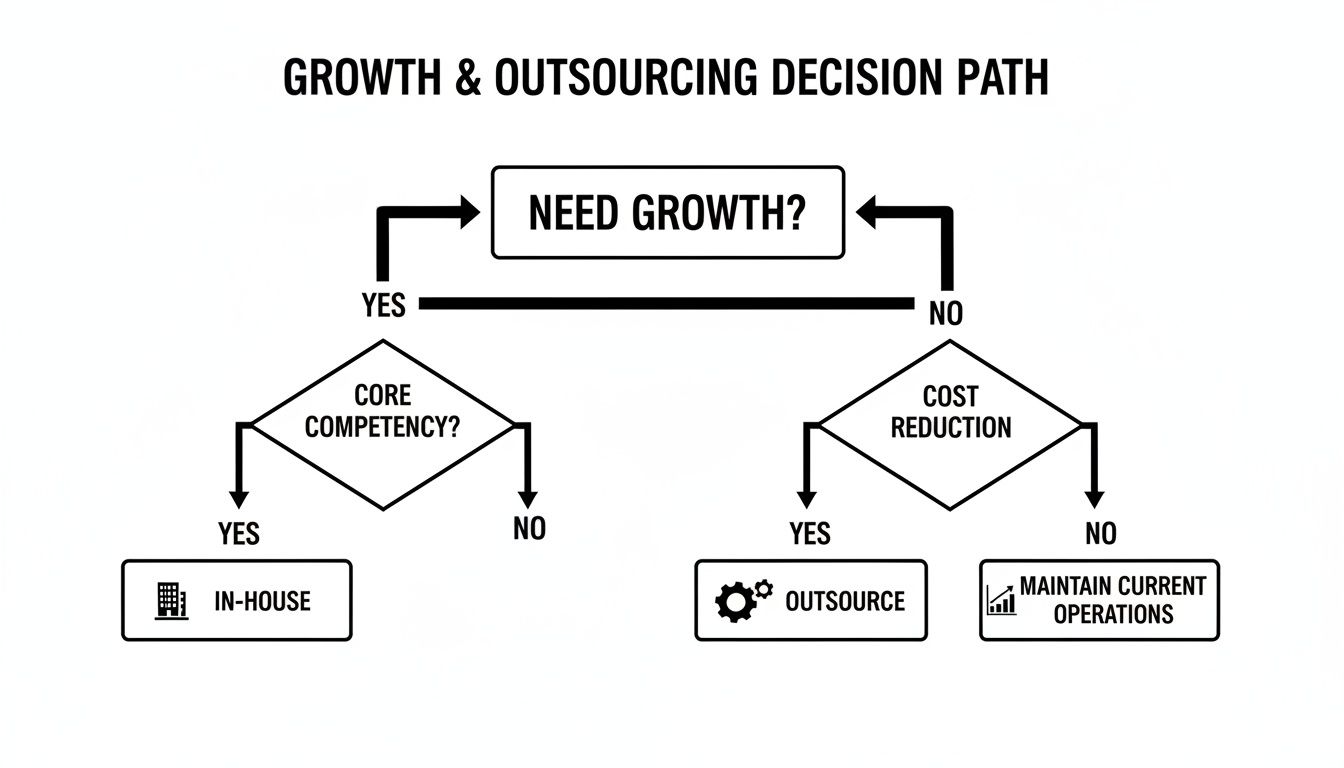
This flowchart lays out the fundamental choice: build your own team or outsource to grow?

A detailed flowchart illustrating the growth and outsourcing decision path for businesses.

As you can see, when growth is the goal, outsourcing is a direct line to expanding what your agency can do without the growing pains of hiring.

Freelancers: The Solo Specialists

Hiring a freelancer, like a wordpress freelancer australia, can be perfect for those small, well-defined jobs. They’re flexible, usually cost-effective, and great for things like a quick wordpress bug fix australia or updating a bit of content. You’re working directly with a specialist, which is great.

But there’s a catch. Relying on just one person for bigger, ongoing work is risky. What if they get sick, get swamped with other clients, or just don’t have the specific skill set for a more complex task? A major Shopify migration australia or a large-scale custom wordpress development australia project needs more than one pair of hands; it needs a team of designers, developers, and QA testers. A single freelancer just can't offer that.

Key Takeaway: Freelancers are brilliant for tactical, short-term tasks. But for strategic growth and delivering complex projects reliably, their limits on availability and skill diversity can seriously hold your agency back.

BPO Firms: The Volume Players

Your traditional Business Process Outsourcing (BPO) firms are all about volume and efficiency. They're set up to handle huge amounts of repeatable tasks for a low price. While that model works for some things, it often falls short for the kind of custom, creative work that agencies do.

Their jack-of-all-trades approach usually means they lack a deep understanding of specific platforms like WordPress or Shopify. You might find their one-size-fits-all processes are too clunky for your bespoke client projects, resulting in generic work that just doesn't hit the mark.

White-Label Agencies: The Strategic Partners

This is where it gets interesting for agencies that are serious about growth. A white label wordpress agency or an agency shopify partner australia operates as a silent, invisible extension of your team. It’s like having a full development department on standby, but without the overheads.

This model gives you the focused expertise of a specialist combined with the reliability and horsepower of an entire team.

  • Deep Platform Knowledge: A partner that focuses on white label wordpress development knows the platform inside and out—way better than a generalist ever could.
  • Scalable Resources: Suddenly land a huge woocommerce development australia project? A white-label partner already has the developers, project managers, and QA team ready to jump in.
  • Built-in Reliability: Unlike a freelancer, a proper agency has backups. If one developer is away, another takes over, so your projects never grind to a halt.
  • Strategic Insight: The best partners do more than just follow orders. A white label shopify expert can offer brilliant advice on things like conversion optimisation or the best apps to use, adding real value to your client strategies.

Ultimately, teaming up with a white label wordpress agency or Shopify specialist empowers you to confidently sell more complex, high-value services. Whether you need ongoing white label wordpress maintenance australia or a brand-new custom build, this model is designed to make your agency’s growth feel effortless. You can explore the different kinds of white-label web development services available to see exactly how they can fill the gaps in your team.

How To Properly Vet a White-Label Partner

Woman working on a laptop displaying images, writing notes, in a modern office with 'VET PARTNERS' branding.

Choosing a white-label partner is one of the biggest calls you'll make for your agency. Get it right, and you've got a seamless growth engine. Get it wrong, and you risk damaging client relationships and your hard-earned reputation. A slick website and a confident sales pitch are just the start; you need to dig much deeper to find a genuinely reliable team.

This vetting process isn't about ticking boxes. It's about stress-testing their capabilities, really getting under the hood of their processes, and making sure their team can truly operate as an invisible extension of your own.

Go Beyond the Highlight Reel

Every potential partner will roll out their greatest hits for you. Your job is to look past the polished final products and analyse the skill and process that went into them. Don't be shy about asking the tough, specific questions that reveal their true depth of expertise.

When you're looking at their portfolio, get granular. For instance:

  • For a "custom WordPress development" project: "Can you walk me through the custom post types and taxonomies you built for this site? What specific problem were you actually solving with that architecture?"
  • For a "Shopify theme development" project: "Did you build this theme from scratch or heavily modify an existing one? Can you show me some of the custom Liquid code you wrote for a specific feature?"
  • For a "WooCommerce development Australia" example: "What were the trickiest shipping rules or payment gateway integrations you had to implement on this build?"

How they answer these questions will quickly separate a genuine WordPress expert Australia from a team just assembling pre-made themes. A true expert will light up, eager to talk you through the technical challenges they've overcome.

Evaluate Their Communication and Project Management

Technical chops are vital, but they mean nothing if your partner is a black hole of communication. The entire success of your digital marketing outsourcing hinges on clear, consistent, and proactive dialogue. This is where you need to check their operational maturity.

Ask to see their project management setup. Are they using a professional tool like Asana, Jira, or Trello? If they're still trying to manage complex projects through a messy chain of emails, that’s a massive red flag.

A partner’s communication style during the sales process is often the best you’ll ever get. If they're slow, unclear, or disorganised now, it's only going downhill once they have your business.

Drill down into their actual processes. How do they handle an urgent WordPress bug fix request from a client? What's their standard turnaround time for feedback and revisions? A solid partner will have clear Service Level Agreements (SLAs) for these exact scenarios. If their answers are vague, they probably don't have the structured workflows needed to support an agency at scale.

Conduct a Paid Technical Trial

Honestly, the single most effective way to vet a partner is to give them a real, paid project—even a small one. Reading case studies is one thing, but seeing how they perform under real-world pressure is priceless. We had a partner do exactly this, and you can see how it played out in this white-label WordPress case study.

This trial isn't just about the final product. It’s a test of their entire system.

  • Did they provide a clear and accurate quote upfront?
  • Was their project brief thorough and did it ask the right questions?
  • How did they communicate progress and handle your queries?
  • Did they hit the deadline they promised?
  • When you got the work back, was the code clean and well-documented?

A small project, like building a custom Shopify section or a specific WordPress feature, is a low-risk way to experience their service firsthand. It's a small investment that could save you from a huge, costly mistake down the track.

Finding the right partner is a serious undertaking. To make it easier, we've put together a checklist of what we look for when bringing on a new white-label team.

Essential Vetting Checklist for Your Outsourcing Partner

Vetting Area Key Questions & Actions Red Flags to Watch For
Technical Expertise & Portfolio Ask to see live examples, not just screenshots. Dig into the "how" and "why" behind their technical decisions. Request code samples for review. Vague answers to technical questions. A portfolio full of template-based sites. Inability to provide code samples.
Communication & Project Management What project management tools do they use? Ask about their process for handling scope creep, feedback, and urgent requests. What are their SLAs? Managing projects via email or spreadsheets. No clear process for common scenarios. Slow response times during the sales process.
Team Structure & Scalability Who is your dedicated point of contact? Are the developers in-house or outsourced themselves? How do they handle workload increases? High staff turnover. The salesperson is the only point of contact. Unclear answers about who is actually doing the work.
White-Label Process & Confidentiality How do they ensure their brand remains invisible to your clients? Review their Non-Disclosure Agreement (NDA) and white-label protocols. No formal white-label process. A weak or non-existent NDA. Hesitation to sign your agency's NDA.
Pricing & Value Is their pricing model clear and transparent? Does it allow for healthy margins for your agency? Do they offer retainers or package deals? Hidden fees or overly complex pricing. Pricing that is too low to be sustainable (often means cutting corners).

This checklist isn't exhaustive, but it covers the critical areas that separate the pros from the pretenders. A partner who can confidently answer these questions is one who takes their role—and your business—seriously.

Getting Your Margins Right: How to Profit from Outsourcing

Overhead view of a calculator, notebook, and a tablet showing a 'Healthy Margins' business graph.

Let's be honest: outsourcing isn't just about expanding what you can offer clients. It’s a powerful lever for growing your agency's bottom line. But that profit doesn't just magically appear. You have to build it into your process from the very first quote.

The fundamental rule of digital marketing outsourcing is simple: you must earn more than you spend. Every time. This means getting comfortable with pricing models and being disciplined about your margins. Without that financial rigour, outsourcing can quickly become a drain on your resources instead of a profit centre.

The good news? With the right framework, you can structure deals that keep your agency healthy while delivering amazing value to your clients.

Understanding the Pricing Models

Your white-label partner will usually have a few ways they price their work. Getting to know the ins and outs of each one is key to quoting accurately and protecting your profit.

  • Project-Based Fees: This is a fixed price for a specific scope of work, like a full website build. It’s great for predictability, which makes quoting your clients a breeze. The catch? You have to manage scope creep like a hawk, otherwise, it can eat into your profits.
  • Hourly Rates: You’re billed for the exact time spent on a task. This model is incredibly flexible, making it perfect for jobs with a fuzzy scope or ongoing tasks like a quick wordpress bug fix australia. The risk here is obvious—costs can spiral if you don't keep a close eye on the hours clocked.
  • Monthly Retainers: You pay a set fee each month for a bundle of agreed-upon services, like ongoing wordpress maintenance australia. Retainers are the holy grail for predictable, recurring revenue, benefiting both your agency and your partner.

We’ve found the most profitable agencies often mix and match. For instance, they might charge a project-based fee for the initial woocommerce development australia and then transition the client onto a monthly retainer for support and updates. It’s a brilliant way to build long-term value.

Calculating Your Markup for Maximum Profit

Your markup is simply the difference between what your partner charges you and what you charge your client. The trick is to find that sweet spot—competitive enough to win the job, but high enough to make it worth your while.

Generally, a healthy markup in the agency world is anywhere from 20% to 50%, though this can shift depending on the project's complexity and the client relationship.

Here’s a quick, real-world example:

A client wants a custom Shopify store. Your trusted white label shopify expert quotes you $8,000 for the build.

  • Your Cost: $8,000
  • Desired Markup: 40% (0.40)
  • Markup Amount: $8,000 × 0.40 = $3,200
  • Price to Client: $8,000 + $3,200 = $11,200
  • Your Gross Profit: $3,200

By doing this simple maths upfront, you've locked in a healthy profit before the project even kicks off.

How to Package and Present White-Label Services

This is critical. You must present the outsourced work as a seamless extension of your own agency's services. Never, ever make it sound like you're just "passing it off."

It's all about branding. Instead of itemising "White-Label SEO" on a proposal, you’d create a branded package like "Our SEO Growth Engine," which just happens to be powered by your partner. This reinforces your agency's value and maintains your position as the expert in your client's eyes.

This kind of strategic packaging is more important than ever. A recent CPA Australia Business Technology Report found that a massive 63% of Australian businesses now have a formal digital strategy. This means the demand for expert support is exploding, fuelling the need for digital agency outsourcing australia as agencies scramble to scale. You can find more takeaways in this report on future marketing trends.

Nailing these financial fundamentals is what separates the agencies that thrive from those that just survive. It turns outsourcing from a tactical choice into a strategic driver of your long-term growth and profitability.

Integrating Your Partner Into a Seamless Workflow

Two men collaborate during a video conference displaying 'Seamless Workflow' and remote participants.

Finding a brilliant white-label partner is a massive win, but let's be honest, that's only half the job. The real magic happens when you bring them into your world so seamlessly they feel less like a contractor and more like an extension of your own team.

Without a solid integration plan, even the most talented partner will feel siloed. That disconnect quickly leads to friction, delays, and, ultimately, unhappy clients. The aim is to completely erase the "us vs. them" mentality right from the get-go.

Setting Up Crystal-Clear Communication Channels

Vague communication is the number one killer of outsourcing partnerships. If your collaboration lives in a messy web of email chains, you’re setting yourself up for failure. You need a central, predictable system for every project-related conversation.

Think of it as your virtual headquarters. The best agencies I've seen create dedicated channels for each client project. This keeps every conversation organised, searchable, and in front of the right eyeballs at the right time.

A couple of methods that work exceptionally well:

  • Dedicated Slack or Teams Channels: Set up a private channel for each client. Invite your internal project manager and the key contacts from your partner’s team. It’s perfect for those quick questions, daily check-ins, and sorting out problems on the fly.
  • Shared Project Management Boards: Using tools like Asana, Trello, or Jira gives everyone total visibility. Both teams can see task progress, deadlines, and dependencies, which kills the need for those constant "what's the status?" emails.

This structured approach is particularly vital here in Australia. Access to skilled talent is a huge driver for outsourcing locally. In fact, recent surveys show nearly 60% of Australian companies outsource to get specialised skills they can't find or afford to hire full-time. To make that investment pay off, your communication has to be flawless. You can find more on this in these insights about Australian outsourcing trends and wins.

Defining Roles and Writing Bulletproof Briefs

Ambiguity is the enemy of efficiency. For a workflow to be truly seamless, everyone needs to know exactly what’s on their plate. Your internal project manager acts as the bridge—they own the client relationship and translate client needs into concrete instructions. Your partner’s role is pure execution, bringing those instructions to life.

The single most important document in this whole process is the project brief. A weak, flimsy brief guarantees a painful cycle of revisions. A strong one gets the job done right the first time.

Pro Tip: Your briefs should be so ridiculously detailed that a developer who knows nothing about the client could pick it up and know exactly what to build. Never, ever assume your partner can read your mind.

For instance, when briefing a team of WordPress developers for agencies Australia, don't just say, "build a contact page." You need to specify the exact fields, the validation rules for each, which email address submissions should go to, and what the "thank you" message should look and feel like. That level of detail leaves no room for error.

Setting SLAs and Tracking Performance with KPIs

To make sure your partner is delivering consistently high-quality work, you need to formalise your expectations. This means setting Service Level Agreements (SLAs) and tracking success with Key Performance Indicators (KPIs). These aren't just corporate jargon; they are the guardrails that keep your partnership on track.

An SLA is basically a contract that defines the service you expect. It should lock down specifics like:

  • Response Times: How quickly will they acknowledge a new request? (e.g., within 4 business hours).
  • Turnaround Times: What’s the standard delivery time for a specific task? (e.g., 48 hours for a minor WordPress bug fix).
  • Quality Standards: What are the non-negotiable checks that must be passed? (e.g., all code must be commented and mobile-responsive).

Hand-in-hand with SLAs, you need KPIs to measure what’s actually happening. Start tracking metrics like the First-Time Right Rate (what percentage of tasks get approved without revisions?), On-Time Delivery Rate, and Client Satisfaction Scores specifically related to the outsourced work. Reviewing these KPIs together each month lets you celebrate what’s working and tackle any recurring issues before they blow up.

Common Outsourcing Questions for Agency Owners

Jumping into digital marketing outsourcing is a huge step, and it's completely normal to have a few questions swirling around. After all, bringing in a partner is a big deal that requires a lot of trust. Let's walk through some of the most common questions we get from Australian agencies, so you can move forward feeling confident.

How Do I Maintain Quality Control When I Outsource Web Development?

This is probably the biggest concern, and rightly so. Your agency's reputation is built on the quality of your work, and that can't be compromised.

The secret to keeping quality high isn't just about checking the final product; it starts with how you choose your partner. Before committing to anything long-term, I always recommend running a small, paid trial project. This gives you a real-world glimpse into their process, communication, and, most importantly, the quality of their work.

Once you’re working together, it's all about shared systems and clear communication. Create a mutual Quality Assurance (QA) checklist that gets used for every single project. Set up a shared project management board so feedback is transparent and nothing gets lost. For specialised jobs like custom wordpress development australia, make sure your partner has their own thorough QA process in place. It’s their job to catch issues before the work even gets to you.

Is It Better to Hire a Freelancer or Use a White-Label Agency?

This one really comes down to your goals, especially when we talk about growth.

A wordpress freelancer australia can be a great resource for smaller, one-off projects or when you just need a quick fix. They’re flexible, you get direct contact, and it’s a simple solution for a self-contained task.

But if you’re serious about scaling your agency and consistently delivering larger, more complex projects, a white label wordpress agency is the smarter play. You’re not just hiring a person; you’re plugging into a proven system. You get access to a whole team of specialists, established project management, and the kind of reliability a single person just can’t offer. Think about ongoing needs like white label wordpress maintenance australia—an agency ensures someone is always on deck, so you don't have that single-point-of-failure risk if a freelancer gets sick or goes on holiday.

Key Takeaway: A freelancer is an extra pair of hands. A white-label agency is a scalable, reliable extension of your entire delivery team. For sustainable growth, the agency model provides a much stronger foundation.

How Should I Manage Client Communication With a White-Label Partner?

This is where the magic of a good white-label relationship really shines. Your partner should be completely invisible to your client.

You remain the one and only point of contact. Your partner works quietly in the background, allowing you to present everything—from a brand new website to a complex shopify migration australia—as your own team’s work.

Your job is to be the strategic link between the two. You’ll manage the client relationship, take their feedback, and turn it into clear, actionable tasks for your development partner. This setup protects your brand equity and builds your client's trust in you. The key is to have a bulletproof internal communication workflow with your partner so you can get updates quickly and answer client questions without missing a beat.

If you want to dig deeper into the nuts and bolts of how this works, our comprehensive white-label agency FAQ covers a lot of these operational details.


At White Label WordPress, we get the challenges that come with scaling an agency because we work with them every day. We provide Australian agencies with reliable, high-quality white-label WordPress and Shopify development, designed to help you grow profitably without the overheads. https://whitelabelwordpress.com.au

Profitable WordPress Maintenance Services Guide

WordPress maintenance is all about the essential, ongoing work needed to keep a client's website secure, up-to-date, and running like a well-oiled machine. For any business with a digital presence, this isn't a luxury; it's a necessity. It’s the proactive care—things like regular backups, security scans, software updates, and performance checks—that acts as a safety net against downtime, hackers, and those dreaded, costly technical meltdowns. As a leading wordpress agency australia, we've seen firsthand how crucial this foundation is.

Defining Your WordPress Maintenance Foundation

Just "offering maintenance" is far too vague. To build a profitable and scalable service, you need to be specific. A well-defined offering shifts you from being a reactive firefighter to a proactive partner, creating a reliable stream of recurring revenue in the process. The goal here is to build a foundation that solves real problems for your clients, sets crystal-clear expectations, and leans heavily on automation to make it all manageable. Whether you're a wordpress freelancer australia or a full-scale agency, this structure is key.

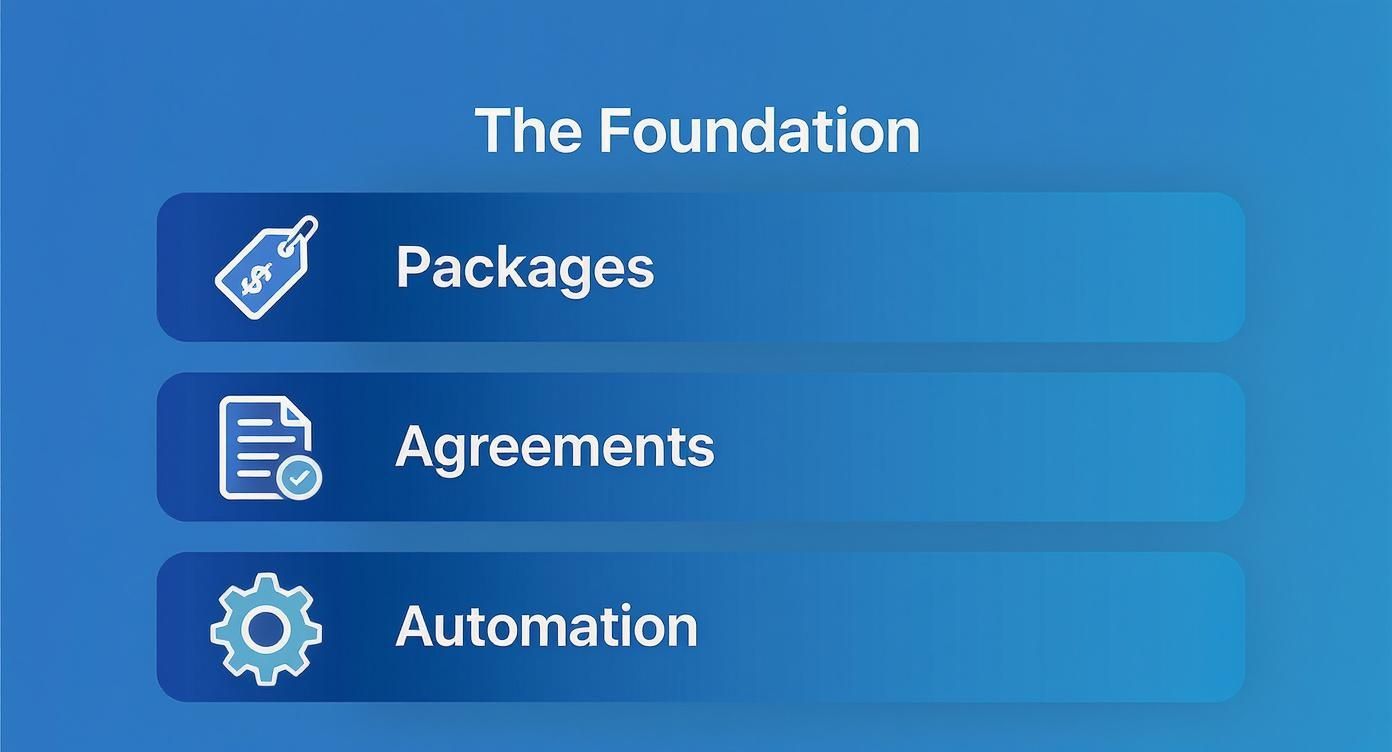
This foundation really comes down to three things: compelling service packages, an ironclad service level agreement (SLA), and the right set of tools. Nail these from the get-go, and you'll save yourself countless headaches from scope creep, client confusion, and administrative burnout down the track.

Structuring Your Service Packages

Think of your packages as your product. They need to be dead simple to understand and scream value. Instead of just listing a bunch of technical tasks, frame them around the outcomes your clients actually care about, like "peace of mind," "better performance," or "business growth." I've always found a tiered approach works best, as it lets you capture clients at different budget levels.

  • The Essentials Plan: This is your foot in the door. It’s for the client who just wants the basics covered—security and uptime. Think of it as their website insurance policy. It absolutely must cover the non-negotiables: daily off-site backups, core WordPress updates, plugin and theme updates, and regular security scans. This is the core of any wordpress maintenance australia plan.
  • The Growth Plan: This one is aimed at businesses that are more active online. It includes everything from the Essentials plan but adds in performance-focused features. You could bundle in database optimisation, uptime monitoring with instant alerts, and maybe 30 minutes of monthly support time for small content edits or a quick wordpress bug fix australia.
  • The Performance Plan: Your top-tier offering is for e-commerce sites or any business-critical website where every second of downtime or slow-loading page costs them money. This package bundles everything from the lower tiers with advanced services like hands-on wordpress speed optimisation australia, extra security hardening, and priority support with much faster response times.

A huge mistake I see agencies make is undervaluing their basic plan. Even your "Essentials" package provides immense value by preventing catastrophic data loss and security breaches. Price it to reflect the professional oversight and peace of mind you're providing.

Crafting a Clear Service Level Agreement

Your Service Level Agreement (SLA) is your rulebook. It's the contract that spells out the scope, boundaries, and expectations of your service, and it's your absolute best defence against scope creep. A good SLA ensures everyone is on the same page. Without one, a simple request for "30 minutes of support" can mysteriously morph into a full-blown website redesign project, far beyond the scope of wordpress website support australia.

A solid SLA should explicitly detail:

  • Response Times: How quickly will you actually get back to a support request? It's wise to define different times for standard issues versus genuine emergencies.
  • Scope of "Support Time": Be brutally clear about what is and isn't covered. For instance, specify that it covers content updates or plugin configuration, but not custom wordpress development australia, graphic design, or SEO strategy.
  • Update Process: Explain your process. When and how are updates done? For higher-tier plans, you should mention that updates are always tested on a staging server first to prevent breaking the live site.
  • Communication Channels: Tell clients exactly how to ask for help. Is it via a dedicated support portal, a specific email address, or a carrier pigeon? Define it.

Choosing Your Automation Toolkit

Let me be blunt: you cannot scale a maintenance service by doing everything manually. Drowning in manual updates and backups across dozens of sites is a fast track to burnout and zero profit. The right tools will automate 90% of your repetitive tasks, freeing you up to manage a huge portfolio of sites with a surprisingly small team. As you grow, looking at a full suite of professional WordPress services can show you what’s possible when you have the right systems in place.

Your essential toolkit needs to include:

  • A Central Management Dashboard: A tool like ManageWP, MainWP, or WPMU DEV is non-negotiable. It gives you one central place to perform updates, run security scans, and generate client reports across every site you manage.
  • A Reliable Backup Solution: While your dashboard might handle backups, a dedicated, robust solution like UpdraftPlus Premium or BlogVault adds a critical layer of redundancy with off-site storage and simple one-click restores.
  • A Premium Security Plugin: You should be installing a powerful security plugin like Wordfence or Sucuri on every single client site for firewall protection and malware scanning.
  • Uptime Monitoring: A service like UptimeRobot is a lifesaver. It sends you an instant alert the moment a client's site goes down, letting you jump on the problem proactively—often before they even know anything is wrong.

Pricing Your Maintenance Packages for Profit

Undercharging is probably the quickest way to turn a potentially profitable WordPress maintenance service into a soul-crushing cost centre. Let’s be blunt: getting your pricing right isn't just about covering your software licences and time. It’s about clearly communicating the immense value you bring to the table. A well-priced plan prevents good clients from leaving, attracts the kind of businesses you actually want to work with, and positions your agency as a premium partner, not just a task-doer. As a wordpress web design company australia, your pricing reflects your quality.

You have to shift your mindset. You're pricing for value, not just the time it takes to click "update". Your clients aren't paying you for the ten minutes it takes to run through a checklist; they're investing in peace of mind. They're paying for the assurance that their digital storefront is secure, online, and running smoothly. They are paying for your expertise, your proactive monitoring, and the catastrophic financial losses you help them avoid.

Think of it like this: your pricing is built on three core pillars—your packages, your agreements, and your automation.

An illustration titled 'The Foundation' with three core elements: Packages, Agreements, and Automation, each with an icon.

When these three elements work in harmony, you create a professional, scalable service that clients are genuinely happy to pay for because they understand the value you're delivering.

Getting a Feel for the Australian Market

Before you start crunching numbers, you need to understand the local lay of the land. Here in Australia, the WordPress maintenance market has a massive range of monthly costs, and it's all tied to a website's size, complexity, and how critical it is to the business. A simple blog, for example, might find a plan anywhere from AUD 100 to AUD 500 per month for the absolute essentials like updates and backups.

But for most small to medium business websites, you’re looking at an average between AUD 500 and AUD 1,000 monthly. These plans usually bundle in better security and specific e-commerce checks, especially for a woocommerce developer australia. When you get into more complex setups like busy WooCommerce stores or sites with custom platforms, the price tag often starts at AUD 1,200 and can easily go beyond AUD 3,000 per month. That number reflects the much higher stakes and the specialised expertise needed. It's also worth noting that one-off emergency fixes can run from AUD 550 to AUD 2,200, which really drives home the value of ongoing, proactive care. There's plenty of data out there on Australian WordPress maintenance costs that can help you benchmark your own strategy.

Calculating Your Real Costs

To build a profitable service, you absolutely must have a crystal-clear picture of your cost of goods sold (COGS) for every single plan. This goes way beyond just your time.

Get out a spreadsheet and list every single expense tied to delivering the service:

  • Software Licences: What's the per-site cost for your management dashboard (like ManageWP), your premium backup solution, security plugins (like Wordfence Premium), and any performance tools? Break it down.
  • Developer Time: Work out a realistic hourly rate for your team (or yourself!). How much time are you actually allocating each month, per client, for running updates, putting together reports, and handling any included support tasks? If you need to hire wordpress developer australia, factor in their cost.
  • Overhead: Don't forget to factor in a slice of your general business expenses. This includes things like your project management software, accounting fees, and insurance.

Once you have a total monthly cost per client, you can apply your desired profit margin. For a service-based business like a WordPress agency in Australia, a healthy margin is typically between 50% and 70%. If you go much lower than that, you're just hamstringing your own growth.

A classic mistake is forgetting to factor in all the "unbillable" time. This is the time spent on client emails, generating those monthly reports, and even sales conversations. To protect your margins, make sure you account for at least one to two hours of this admin overhead per client each month in your cost calculations.

Building a Tiered Pricing Model

A tiered model is, without a doubt, the most effective way to present your WordPress maintenance services. It naturally guides clients to the best-fit plan for their specific needs and budget, which makes the whole sales conversation a lot less awkward.

Here’s a look at how you can structure different tiers, providing clear upgrade paths and making the value proposition obvious at each level.

Sample WordPress Maintenance Package Tiers

Feature Basic Care Plan (AUD 150/month) Business Growth Plan (AUD 550/month) Performance Plus Plan (AUD 1,200+/month)
Core, Theme & Plugin Updates ✔️ (Monthly) ✔️ (Weekly) ✔️ (Weekly, on Staging First)
Daily Off-site Backups ✔️ ✔️ ✔️
Security Monitoring ✔️ (Basic Scans) ✔️ (Advanced Firewall) ✔️ (Proactive Hardening)
Uptime Monitoring ✔️ (Email Alerts) ✔️ (Instant SMS Alerts) ✔️ (Instant SMS Alerts)
Monthly Client Report ✔️ ✔️ (Branded & Detailed) ✔️ (Branded with Analytics)
Included Support Time 30 Minutes/Month 60 Minutes/Month
Performance Optimisation ✔️ (Database & Image Optimisation) ✔️ (Advanced Caching & CDN)
WooCommerce Support ✔️ (Priority Support)

This kind of structure does more than just list prices. A client starting out on the Basic plan can immediately see the tangible benefits of moving up to the Business Growth plan once their website becomes more central to their operations. Your pricing page is no longer just a menu of costs; it's a strategic sales tool that educates clients and justifies your fees.

Creating a Flawless Client Onboarding System

The first few interactions you have with a new maintenance client will define the entire relationship. Get it wrong, and you’re starting on the back foot. A clunky, disorganised onboarding process creates friction and seeds doubt right from the get-go.

But a smooth, professional system? That builds immediate trust. It makes your client feel confident they made the right choice, and it's your first real chance to show them the value and peace of mind you sold them on.

This isn’t just about grabbing a few passwords. It's a structured process that heads off future risks, sets a clear performance baseline, and plugs the client's site directly into your management workflow. A solid system means you have everything you need to do your job well, from day one. This is also true for any kind of shopify maintenance australia service you might offer.

Person holding a tablet displaying a digital checklist, symbolizing seamless onboarding, on a wooden desk.

Gathering the Essential Information

Before you even think about touching a line of code, you need full access. Trust me, chasing clients for logins weeks after they've signed up is not a good look. It's inefficient and looks completely unprofessional. Get ahead of it by using a secure online form or a client portal to gather all the necessary details at the very beginning.

Here’s what you absolutely need to ask for:

  • WordPress Admin Access: An administrator-level username and password.
  • Hosting Provider Login: Credentials for their hosting account (think cPanel, SiteGround, WP Engine, etc.).
  • Domain Registrar Login: Access to wherever their domain name is actually managed.
  • CDN Credentials: If they’re using a Content Delivery Network like Cloudflare, you'll need in.
  • Premium Plugin & Theme Licences: Get all the licence keys for their paid-for products. This is crucial for them to receive legitimate updates.

Now, a quick but critical word on security: storing this info is a huge responsibility. Use a proper password management tool like 1Password or LastPass that allows for secure team sharing. Never, ever store credentials in a spreadsheet or a plain text document.

Conducting the Initial Site Audit

Once you have the keys, your very next step is a deep-dive site audit. This isn't optional. This diagnostic phase is vital for two reasons: first, it uncovers pre-existing issues you aren't responsible for, and second, it gives you a clear performance baseline so you can actually prove the improvements you make over time.

Your audit should be a thorough documentation of the website's current state. Pay close attention to:

  • Performance Metrics: Run speed tests using tools like GTmetrix or PageSpeed Insights. You need to record the initial load time, page size, and those all-important performance scores.
  • Plugin and Theme Health: Hunt for any outdated, abandoned, or—even worse—nulled (illegally downloaded) plugins. These are massive security risks just waiting to happen.
  • Security Posture: Run an initial malware scan to make sure you’re starting with a clean slate. Also, check for weak user passwords and other common weak spots.
  • Backup Status: See if they have any existing backup systems. Are they even working?

Document everything. A pre-onboarding audit report is your get-out-of-jail-free card if an old, dormant issue blows up later. It clearly defines the starting line, making the value of your ongoing wordpress maintenance services undeniable when you show them the "before and after".

System Integration and Kick-off

With the audit done, it's time to bring their site into your world and officially kick things off. This is where your chosen automation tools really shine. You'll need to connect their site to your central management dashboard, whether that's ManageWP or MainWP.

This integration lets you schedule the first full, off-site backup under your control. Done. Next, configure your standard security and performance plugins according to your agency’s best practices. And finally, get uptime monitoring switched on so you get an instant alert if the site ever goes down.

The last piece of the puzzle is communication. Send a "Welcome Aboard" email confirming that the onboarding is complete. This email should briefly summarise the initial health check, confirm that backups and monitoring are now active, and remind them how to get in touch for support. That one email does so much to reassure the client that their website is now in safe, professional hands.

Scaling with White Label WordPress Services

So, you've done the hard work. You’ve built a solid foundation for your maintenance services and have a happy, growing list of clients. The next logical step is to scale, but this is where many agencies hit a classic bottleneck. Do you take on the significant risk, cost, and administrative headache of hiring more in-house developers?

Thankfully, there's a much smarter, more agile way to grow.

This is where a white label wordpress agency comes into the picture. Partnering with a specialist provider lets you expand your service capacity almost overnight, all without adding a single new employee to your payroll. It’s a strategic move that allows you to offer expert-level support under your own brand, keeping the client relationship entirely in your hands. This strategy is also popular for white label shopify services.

The True Value of a White Label Partnership

At its core, white-labelling is about leverage. You get immediate access to a team of seasoned WordPress experts who can handle everything from routine updates and bug fixes to complex custom WordPress development in Australia. This instantly broadens the scope of services you can confidently sell to your clients. A partnership with a white label wordpress designer can elevate your design offerings, too.

The biggest benefit? It frees up your internal team to focus on what they do best—whether that’s design, strategy, or closing new deals. Instead of getting bogged down in technical troubleshooting or frustrating plugin conflicts, your team can concentrate on nurturing client relationships and growing the business. This is the essence of wordpress outsourcing australia. The result is a more efficient, focused, and ultimately more profitable agency.

We dive deeper into this model in our comprehensive guide to white label WordPress solutions.

Vetting the Right White Label WordPress Support Partner

Choosing a partner is a huge decision that directly impacts your brand's reputation, so it’s crucial to get it right. Not all white-label providers are created equal. You're not just looking for a subcontractor; you need a partner who acts as a true extension of your team, delivering the same quality and care your clients expect from you. When you outsource wordpress development australia, you're entrusting your client's site to someone else.

When you're vetting potential partners in Australia, you need to dig deeper than their sales pitch. Ask the hard questions that reveal how they really operate:

  • Communication: How will we communicate? Will I have a dedicated account manager who knows my clients and my business? What are their guaranteed response times?
  • Workflow: Can you walk me through your process for handling a support ticket? What project management tools do you use, and will I have visibility?
  • Expertise: Show me some examples of complex problems you've solved. Do you have specific experience with WooCommerce, LearnDash, or other complex plugins my clients rely on?

The most important factor, by far, is trust. A great white-label partner is transparent, reliable, and communicates proactively. They should make you feel like they have your back, not like you're just another ticket in their system.

Here in the Australian market, this approach has become quite sophisticated. Many providers bundle a comprehensive set of services into their offerings. For instance, it’s common for local agencies to include regular plugin and core updates, performance optimisation, and security scans in plans starting from around AUD 1,980 per month, especially when they include hours for custom development. This makes finding reliable wordpress developers for agencies australia a game-changer.

These robust plans are often designed for businesses needing campaign-ready websites without long-term commitments, covering everything from spam filtering to emergency support. This model, focused on expert local support with no offshore handovers, is a key reason for high client satisfaction and shows the maturity of WordPress maintenance services in Australia. You can explore the details of Australian WordPress maintenance plans to see how they're structured.

Red Flags to Watch For

Just as important as knowing what to look for is knowing what to avoid. Be wary of any provider who is vague about their processes, offers pricing that seems too good to be true, or is slow to respond during the initial vetting phase. These are almost always early warning signs of a disorganised or overwhelmed team.

Ultimately, a strong white-label partnership is built on clear communication, shared standards, and mutual trust. Finding the right white label wordpress support partner isn't just about outsourcing tasks; it's about building a strategic alliance that will fuel your agency's growth and profitability for years to come.

How to Market and Sell Your Maintenance Plans

You can build the most technically brilliant WordPress maintenance service in the world, but if you can’t sell it, you’ve just got a great idea that isn’t making you any money. The real art of selling maintenance is getting the client to see it for what it truly is: a critical investment in their business, not just another line item on their monthly expenses.

Your entire sales pitch needs to reframe the conversation from reactive repairs to proactive protection. Think of it like this: a client wouldn't dream of running their physical shop without insurance against fire or theft. So why on earth would they leave their digital storefront completely exposed? That’s the core message you need to drive home, every single time. A solid pitch will set you apart as a top wordpress expert australia.

Two professionals at a table reviewing documents and a laptop under a 'SELL MAINTENANCE' sign.

Frame It as an Investment, Not a Cost

The words you choose will make or break the sale. Stop talking about "plugin updates" and "database optimisation." Honestly, clients don't care about the technical details. They care about business outcomes. Your marketing copy, proposals, and conversations should speak directly to their biggest fears and aspirations.

Try framing your services around these compelling angles:

  • Security: "Think of our maintenance plan as a 24/7 security guard for your website. We actively defend it from hackers and malware that could leak customer data and completely tarnish your reputation."
  • Performance: "A slow website literally costs you money. We keep your site lightning-fast, which keeps visitors happy, engaged, and boosts your rankings on Google."
  • Peace of Mind: "You should be focused on running your business, not stressing about your website. We handle all the technical heavy lifting behind the scenes so you don't have to."

Your best sales tool is a good story. Share a brief, anonymised horror story about a business that didn't have a maintenance plan. Talk about the frantic late-night phone call, the sales lost during downtime, and the eye-watering cost of an emergency clean-up. Then, show them how your service is the hero that prevents that exact nightmare.

Bundle Maintenance with Every New Project

Here’s one of the most effective strategies I’ve seen: stop selling maintenance as an optional add-on. From now on, it’s a standard, non-negotiable part of every new wordpress website design australia project you quote. Include 3-6 months of your mid-tier maintenance plan right in the initial project cost.

This approach works wonders for a few reasons. First, it ensures the beautiful websites you build stay secure and running smoothly, which directly protects your agency's reputation. Second, it lets the client experience the benefits firsthand, making the switch to a paid monthly plan a seamless continuation of service, not a jarring upsell later.

The Australian market for WordPress maintenance services is really hitting its stride, with agencies using more sophisticated tools and pricing models. We’re seeing monthly plans that range from around USD 39 for the basics up to USD 1,099+ for premium packages with dedicated developer time or advanced WooCommerce support. With WordPress powering roughly 43.5% of the web, proactive security is no longer a luxury—it’s an expectation.

Use Data to Upsell Existing Clients

Got clients who aren't on a plan yet? Your monthly reports are your secret weapon. But a report that just says "15 plugins updated" is boring and useless. A valuable report shows the client all the bullets you dodged for them.

You need to transform your reports from a simple log into a powerful sales document. Start highlighting metrics that matter:

  • Security Threats Blocked: "This month, our firewall blocked 1,254 malicious login attempts from reaching your site."
  • Uptime Percentage: "Your website maintained 99.98% uptime, ensuring it was always online for your customers."
  • Performance Gains: "We shaved 1.2 seconds off your homepage load time, which can directly improve your conversion rates."

When a client sees tangible proof that you're actively protecting their investment, the monthly fee suddenly feels like a bargain. This data-driven approach makes the renewal conversation a no-brainer and constantly reinforces the value you deliver. If you're looking for more ways to grow your agency, the articles over on the White Label WordPress blog are a great place to start.

Got Questions About WordPress Maintenance? We've Got Answers

Diving into WordPress maintenance services can feel like you're charting new territory. It's totally normal to have a heap of questions about pricing, the right tools for the job, and what you should actually include in your plans. Getting these things sorted from the get-go is the key to building a service that's not just profitable, but also a breeze to manage.

Let's tackle some of the most common questions we hear from agency owners just like you. The goal here is to give you straight-up answers so you can dodge the usual mistakes and set up your maintenance plans for success.

How Much Should I Charge for WordPress Maintenance in Australia?

There's no magic number here. Your pricing really hinges on how complex a site is and the real-world value you’re providing. For a basic brochure site or a simple blog, you’re typically looking at a range of $100 to $500 per month in the Australian market. This usually gets them the essentials: backups, updates, and security scans.

When you're dealing with e-commerce stores on WooCommerce or other business-critical sites, the price naturally goes up. Think somewhere between $500 and $1,200 a month. That higher price is justified by things like performance tuning, priority support, and a faster response time. For highly customised or complex sites requiring woocommerce development australia, it’s not uncommon to see prices climb well above $1,200. Remember, you're not just selling hours; you're selling peace of mind.

What Are the Must-Have Tools for Managing Client Sites?

Trying to manage multiple sites without a central dashboard is a recipe for disaster. You absolutely need a tool like ManageWP, MainWP, or the WPMU DEV Hub to handle updates, backups, and security from one place. These platforms are the foundation of any scalable maintenance service.

But your toolkit shouldn't stop there. To do this properly, you'll also need:

  • An independent, off-site backup solution. Think UpdraftPlus or BlogVault for that extra layer of redundancy.
  • A premium security plugin. A good firewall and malware scanner from something like Wordfence or Sucuri is non-negotiable.
  • An uptime monitor. A service like UptimeRobot will ping you the second a client's site goes down, so you can be the hero who fixes it before they even notice.

Should I Include Development Time in My Plans?

This can be a brilliant move, but you have to be careful. Offering a small block of time—say, 30 to 60 minutes—for "small tasks" in your higher-tier plans is a fantastic way to keep clients on retainer. It stops them from wandering off to find someone else for those tiny tweaks.

The catch? Your Service Level Agreement (SLA) has to be rock-solid about what a "small task" actually is. Define it clearly to avoid scope creep. For instance, maybe content updates and minor CSS changes are fair game, but building new page templates or adding custom features is definitely not. Anything that falls outside that scope needs to be quoted as a separate project. This protects your time and keeps everyone on the same page. If you need a dedicated wordpress developer australia, you can always bring them in for larger projects.

A valuable client report is one that proves your worth beyond doubt. It should be automated, professionally branded, and easy for a non-technical person to understand. Instead of just listing tasks, focus on tangible results: security threats blocked, uptime percentage, and performance improvements. Highlighting the problems you prevented is far more powerful and builds the trust needed to justify your fee month after month.


Ready to scale your agency without the overhead? White Label WordPress provides expert, behind-the-scenes WordPress and Shopify development that you can resell under your own brand. Let us handle the technical work so you can focus on growth. Learn more about our white-label services.