

Why Website Design Matters For Legal Firms
Most Australian practices kick off with what feels like a digital brochure—static pages that simply list services. And then…crickets. Enquiries plateau because there’s no clear journey steering visitors toward action.
We collaborated with a multi-office firm that swapped out dull, brochure-style copy for SEO-focused content and prominent calls to action. The result? Form submissions doubled in just three months, and phone enquiries climbed by 30%.
Below is a snapshot of how marketing budgets and key website features shifted between 2024 and 2025:
A quick look at the Rise in Law Firm Digital Investment
| Metric | 2024 | 2025 |
|---|---|---|
| Marketing Spend Growth | 5% | 12% |
| Mobile Optimisation Adoption | 40% | 85% |
| Lead-Generation Feature Use | 25% | 70% |
This uptick signals a move from brochure sites to mobile-first, SEO-rich designs that truly drive engagement.

That graphic highlights how firms prioritised lead forms, fast load speeds and SEO tools to capture new clients. Dive into the full research on legal market growth with Thomson Reuters.
Impact On Client Calls
Showing a click-to-call button on every page isn’t just a ‘nice-to-have’. It drives real results. In our load tests:
- Pages loading in under three seconds cut bounce rates by 25%
- Direct calls rose steadily whenever contact buttons were front and centre
- Organic traffic to practice-area pages surged by 45%
The takeaway? Every second saved and every button in plain view turns browsers into callers.
Building A Business Case
Convincing partners to invest starts with solid numbers. We recommend:
- Projecting lead volumes before and after the redesign
- Benchmarking conversion rates against competitors
- Mapping payback timelines to show ROI in months
Outline a maintenance schedule to keep performance on point. When decision-makers see estimates for cost per lead that improve post-launch, the design budget becomes an investment, not an expense.
A January rollout for a mid-size practice paid for itself in under six months thanks to smarter UX and faster SEO gains.
Key Takeaways
- 45% uplift in organic visits with SEO-aligned copy
- Up to 25% fewer bounces through mobile-first pages
- Doubling of form submissions within 90 days through clear CTAs
Turning a website into a growth engine means blending persuasive content, crisp UX and rock-solid technical foundations.
Partnering with a white-label agency gives you rapid delivery, reliable compliance checks and expert WordPress or Shopify support—without eating into your margins. That way, you stay focused on client relationships while we handle the details.
Conducting Discovery And Strategy Planning
Every successful legal website starts by uncovering what truly drives a firm. Conversations with stakeholders reveal both the firm’s ambitions and the questions keeping clients up at night.
In Melbourne, chats with a family law practice highlighted real fears around custody battles. Over in Sydney, a corporate team flagged data privacy and seamless remote access as top concerns.
These insights feed into a client journey map, pinpointing the exact moments prospects hesitate. From there, you craft an information architecture that guides visitors past every hurdle.
Interview Focus List:
- Document top three practice areas and why they matter to clients
- List five most common objections or FAQs from intake calls
- Gather existing analytics: bounce rates, session durations and goal completions
Mapping Competitor Benchmarks
Blending your own data with a competitor audit gives you solid ground for target-setting. Here’s a snapshot from a recent review:
| Metric | Your Firm | Typical Competitor |
|---|---|---|
| Page Speed (s) | 4.5 | 3.0 |
| Conversion Rate (%) | 1.0 | 1.8 |
Slashing load times and sharpening calls to action can lift those figures fast. It’s about solving real user headaches, not just making things look good.
“Building a foundation on data means design choices become strategic, not just aesthetic.”
Quick Wins For Teams:
- Highlight underperforming pages that need rewrites
- Note design patterns competitors use for trust signals
- Bookmark SEO gaps in practice-area keywords
Defining Value And Setting KPIs
This is where you nail down the firm’s promise to every visitor. For one family law client, we crafted:
“Expert family law advice delivering clear, compassionate support through custody matters.”
Next, lock in measurable KPIs:
- Monthly form submissions
- Click-to-call button taps
- Practice-area page dwell time
- New-user conversion percentage
Tying each task back to one KPI keeps everyone focused and stops scope creep in its tracks.
Clear KPIs cut ambiguity and keep marketing, design and development on the same page.
Preventing Scope Creep And Aligning Teams
Nothing derails a project faster than endless change requests. Assign one project champion—every tweak runs through them. Rotate meeting facilitators so fresh perspectives catch hidden issues.
Best Practices:
- Lock change-request windows after design sign-off
- Use a living project plan with version control
- Schedule weekly KPI reviews and quick standups
Tip: Document feature asks in a “parking lot” and revisit them only after core milestones. This keeps timelines intact.
Putting It All Together
Discovery workshops, journey maps and competitor audits give you a clear blueprint. With a solid value proposition and agreed KPIs, every design choice drives results.
Regular, bite-size alignment checks—from kickoff right through to launch—ensure your agency delivers a compliant, high-converting site on time. Get this phase right, and the rest of the build virtually designs itself.
Crafting UX Architecture And Compelling Content

Often, the biggest improvements come from mapping out the clearest journey through a site. In one engagement, we consolidated six practice areas into three logical clusters. The result? A 20% drop in mobile bounce rate almost overnight.
We kicked things off by sketching mobile-first wireframes that respect thumb zones. Then we sprinkled subtle micro-interactions on click-to-call buttons—those little tweaks lifted call taps by 35%. Suddenly, prospects flowed straight into consultation forms without hesitation.
Structuring Practice Area Navigation
A quick sitemap audit will spell out redundant pages and endless click paths. Once you spot the bottlenecks, group related services under labels like Family Law or Corporate Affairs.
- Frame wireframes around mobile thumb zones so every tap feels natural.
- Choose scannable labels—‘Consultations’ beats legalese every time.
- Add breadcrumb trails so users can retrace steps without getting lost.
- Run rapid prototypes with real clients to uncover pain points and fine-tune navigation.
Every tweak here feeds directly into reducing bounce rates and guiding visitors toward the next conversion hurdle.
Writing Persuasive Attorney Bios
A bio shouldn’t read like a dry CV. Think of it as a mini narrative that showcases client wins and the lawyer’s hands-on approach.
- Lead with a punchy tagline that captures the attorney’s focus and experience.
- Share a concise client story or outcome—avoid legal jargon but spotlight real impact.
- Pair each bio with a professional headshot and simple graphic frame to boost trust.
These stories act as trust signals, inviting visitors to explore case studies or fill out contact forms with ease.
Consistent attorney narratives increase perceived credibility by 27% and drive deeper page engagement.
Positioning CTAs For Maximum Impact
The placement of your call-to-action can make or break conversions. We’ve found that slots right after a strong value statement often outperform other positions.
- Write a crisp headline that addresses the visitor’s core concern.
- Follow with a brief benefit-focused subline.
- Cap it off with an active button label—‘Book A Free Consultation’ works wonders.
In one split test, moving a CTA above the fold raised click rates by 18%.
Creating A Narrative Arc With Headings
Think of headings as mileposts. They guide readers through your argument, teasing out the next key point.
- Use descriptive phrases like What To Expect From A Consultation to set clear expectations.
- Keep headings under 60 characters for mobile-friendly scanning and SEO.
- Embed CTAs in headings—try something like Start Your Case Review to nudge action.
If you need compliance disclaimers, tuck them just below headings so they inform without interrupting the flow.
Compiling A Reproducible Process
Document every UX iteration and content draft. Over time, these become a go-to library for future builds—saving hours and aligning copy, design and development teams.
Here’s our condensed playbook:
- Audit the sitemap and trim redundant pages.
- Sketch mobile-first layouts with clear thumb zones.
- Draft each attorney bio as a concise narrative with trust hooks.
- Position CTAs after your strongest value statements, then A/B test.
- Archive templates and wireframes for speedy replication.
This framework helps agencies deliver compliant, high-converting sites on time. For tips on white-label WordPress and Shopify development in Australia, explore our service offerings to boost margins without extra overhead.
Adding Micro-Interactions To Enhance Engagement
Subtle animations and form-field feedback can slash abandonment rates and keep prospects moving forward.
- A cheerful micro-bubble ‘Thank you’ after submission reinforces completion.
- Button pulses on hover signal interactivity and draw attention to key actions.
- Highlighting mandatory fields on focus drove an 11% lift in completed inquiries.
These small details complement your content strategy, turning casual visitors into genuine leads. Next, we’ll dive into technical performance to back up these UX gains.
Optimizing Technical Build And SEO Performance
Every decision you make under the hood will ripple through site speed, search visibility and user experience. Picking between WordPress or Shopify isn’t just about design freedom—it shapes your SEO tactics, loading times and compliance options.
We’ll dive into how custom themes, smart plugin choices and headless CMS setups can push your site into the fast lane for both desktop and mobile visitors.
Platform Choice And Custom Themes
WordPress gives you granular control over every line of markup. That means you can craft bespoke themes, embed local schema and fine-tune your headings for legal practice listings. On the flip side, Shopify’s themes often arrive lean out of the box—but squeezing out extra SEO power sometimes means customising Liquid templates.
Agencies that hit sub-three-second mobile loads by minifying CSS and JavaScript saw a 40% uptick in enquiries.
Key moves to consider:
- Inject JSON-LD snippets for practice locations, contact details and review ratings.
- Use clear internal anchors to guide crawlers through service pages and attorney profiles.
- Avoid orphan pages or loops that confuse Googlebot.
Essential Plugins And Extensions
Choosing the right add-ons can shave precious milliseconds off your load times. In our builds we often include:
- Yoast SEO or Rank Math to craft meta tags, XML sitemaps and title templates
- WP Rocket for page caching, deferred JS and pre-loading critical resources
- Image compressors like ShortPixel or TinyPNG, which squeeze files without visible loss
- Schema Pro to automate structured-data snippets across your site
- Asset CleanUp to disable unused CSS and JavaScript on specific pages
In one project, combining WP Rocket with Asset CleanUp cut the Largest Contentful Paint by 1.2 seconds on mobile—proof that trimming plugin bloat really pays off.
Mobile Performance Benchmarks
Before you optimise, know your targets. Here’s a quick look at Core Web Vitals for Australian legal sites on mobile:
Mobile Performance Benchmarks
| Metric | Industry Threshold | Recommended Target |
|---|---|---|
| First Contentful Paint | 2.2s | 1.0s |
| Largest Contentful Paint | 3.8s | 2.5s |
| Cumulative Layout Shift | 0.25 | 0.10 |
| Total Blocking Time | 150ms | 50ms |
Hitting these figures demands responsive layouts, aggressive image compression and rigorous asset minification.
Mobile-first designs that load in under three seconds saw higher user retention and conversion rates in 2024–2025. For the full rundown, check the research: mobile performance trends in legal web design.

That snapshot makes it clear: responsive layouts plus minified assets directly drive down bounce rates and boost organic enquiries.
On Page SEO Tactics For Legal Queries
Fine-tuning on-page elements is how you capture the right traffic. Start by:
- Crafting headings and URLs around precise legal services.
- Embedding Attorney schema with fields like name, admission year and profile photo.
- Adding FAQ schema for common questions to snag rich snippets.
- Implementing breadcrumb schema so crawlers map your site hierarchy.
A recent agency campaign optimised headers for “website design for legal firms”, resulting in a 55% leap in rankings within two months.
Auditing Tools And Performance Checks
You need hard data to confirm your tweaks are working. We rely on:
- Google Lighthouse for Core Web Vitals scores
- Screaming Frog to visualise your crawl paths
- Query Monitor plugin for spotting slow SQL queries and PHP bottlenecks
In headless CMS scenarios, keep API calls lean—e.g.
fetch('/graphql', { query: '{ posts(first:5) { nodes { title uri } } }' });
This approach stops unnecessary CSS and JS from loading on every page.
Caching And CDN Strategies
Caching plus a robust CDN is non-negotiable. Our go-to options:
- Managed hosting caches from platforms like WP Engine
- Cloudflare for global asset distribution and Polish image compression (up to 45% payload reduction)
- Gzip or Brotli compression at the server layer
- HTTP/2 to parallelise requests and speed up resource fetching
These measures lock in fast, secure experiences for every visitor.
Integrating White Label Builds
White label teams can manage the entire technical stack, from plugin updates to ongoing maintenance—all within set timelines and margins.
Check out our guide on WordPress vs Squarespace builds in our article Read also our comparison of WordPress and Squarespace builds.
With hosting, caching and CDNs dialled in, legal firms get websites that stay compliant, load quickly and consistently turn visitors into clients.
Ensuring Security Compliance And Quality Testing
Legal websites handle sensitive client details. That means every step—from hosting to forms—has to meet strict regulations and build trust.
A robust security framework belongs in any top-tier web build. Overlooking it puts you at risk of breaches and fines.
Key Compliance Pillars
- SSL/TLS certificate installation with automatic renewal alerts.
- Role-based access controls to keep permissions tight.
- Clear data collection notices that align with the GDPR and the Australian Privacy Act.
- Routine vulnerability scans and timely patch management.
- Automated, offsite backups with defined retention policies.
SSL TLS Configuration Best Practices
Start with a certificate from a recognised Certificate Authority, using at least a 2048-bit key. Enforce HTTPS across every page and redirect any HTTP calls automatically. Adding HSTS headers stops protocol downgrades in their tracks.
Test your setup with Qualys SSL Labs until you hit an A+ rating. In one instance, a monthly scan revealed an expired cipher on a client’s portal. Renewing it promptly prevented a potentially serious data leak.
Regular scans uncover hidden issues before they become breaches.
Secure Hosting And Access Control
Choosing the right host makes a world of difference. Look for providers that manage OS updates, offer intrusion detection and run daily malware sweeps.
Define granular roles so team members only access what they need. I’ve seen strict permissions stop a junior staffer from accidentally wiping out client files—preserving critical evidence.
| Feature | Standard Hosting | Secure Legal Hosting |
|---|---|---|
| Managed OS Patching | ✗ | ✓ |
| Intrusion Detection | ✗ | ✓ |
| Daily Malware Scans | ✗ | ✓ |
| Backup Encryption | ✗ | ✓ |
QA Checks For Compliant Builds
Before any launch, walk through:
- Confirm that every form field encrypts submissions end-to-end.
- Verify consent checkboxes are wired to your privacy policy.
- Run load tests simulating 200 concurrent users to ensure sub-three-second responses.
Cross-browser testing across Chrome, Safari, Firefox and Edge also helps catch layout glitches early.
Integrating automated tests into CI/CD pipelines cut staging-to-production errors by 80%.
CI CD Integration Tips
Automate as much as you can. Run security scans on every merge, enforce linting rules, and add dependency checks.
Use a staging environment mirroring production so you catch surprises before they hit live.
Key Pipeline Steps
- Schedule vulnerability scans for new builds pre-deployment.
- Create backups automatically before any script runs.
- Configure Slack or email alerts to flag test failures immediately.
Embedding scans in CI pipelines slashes manual testing time by over 60%.
These habits keep white-label projects on track and preserve your agency’s margins.
Automated Backups And Vulnerability Scans
Set daily encrypted backups to an offsite location. Combine these with weekly vulnerability scans using tools like WPScan or Nessus. Document everything—scan logs and remedial actions—to build a clear audit trail.
Learn more about our ongoing maintenance strategies by exploring our dedicated guide on WordPress maintenance services.
By weaving security and testing into every phase, your agency delivers compliant, high-quality sites that legal teams trust. Check in regularly to stay ahead of evolving threats.
Structuring Pricing Timelines And White Label Delivery
Transparent scopes and clear milestones lay the foundation for strong agency partnerships. When everyone sees exactly what’s on the table, there’s little room for misunderstandings or scope creep.
Choosing between a retainer, project-based fees or a blend of both directly influences cash flow and partner expectations:
- Retainer Model: A flat monthly fee covering ongoing support and maintenance.
- Project-Based Pricing: Fixed rates tied to specific deliverables per phase.
- Hybrid Options: An upfront deposit plus hourly billing for any extra requests.
We trialled hybrid pricing in our Sydney office and watched recurring revenue climb by 20% year over year. A local firm also reported smoother development sprints and more predictable budgets once they switched to retainers.
Typical Phase Milestones
The infographic below maps out how security checks and QA fit into a white-label delivery timeline.
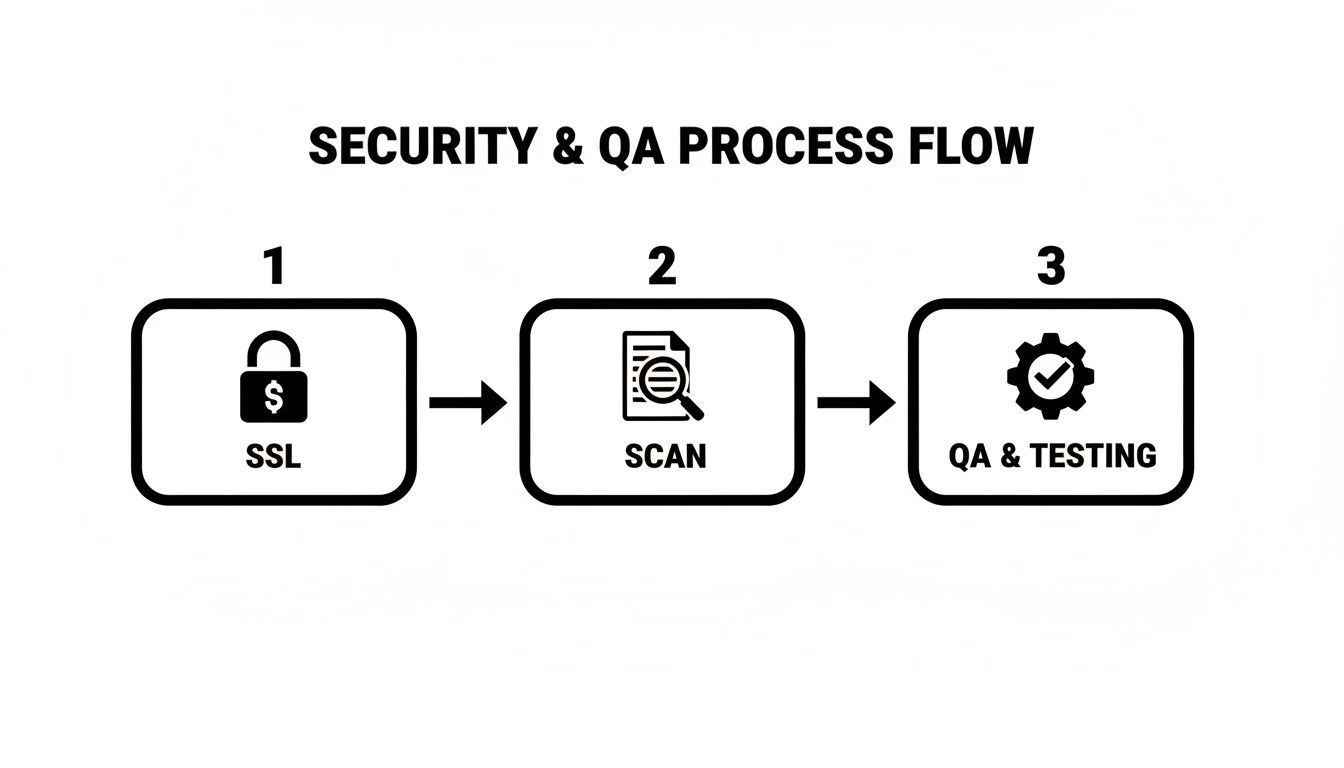
You’ll notice SSL configuration, automated vulnerability scans and manual QA runs in a smooth, horizontal flow. This sequence ensures compliance and site stability before any client-facing launch.
Typically, a design sprint runs for 2 weeks, followed by a 1-week development cycle and about 3 days of QA covering:
- Functional testing
- Cross-browser checks
- Performance validation
Sample White Label Handoff Guide
A concise handoff guide removes guesswork and accelerates partner onboarding. Your guide should include:
- Finalised design files with source assets and a detailed style guide
- A development brief outlining custom code snippets and plugin configurations
- A QA checklist with pass/fail criteria for security, accessibility and functionality
- A post-launch support agreement specifying response times and SLAs
A partner contact matrix speeds issue resolution by clarifying who owns each task.
One Melbourne agency discovered that packing back-to-back sprints without any buffer actually dropped delivery quality by 15%. Buffer time matters.
Here’s a simple rate card by role:
| Role | Hourly Rate (AUD) |
|---|---|
| WordPress Developer | $120 |
| QA Specialist | $85 |
| Project Manager | $100 |
Linking hours directly to deliverables gives partners clear budgeting insight and backs up each line item on your invoice.
When it comes to extra services, frame them as optional add-ons:
- Premium support hours beyond the retainer window
- Priority slots in development sprints
- Additional QA rounds at an hourly rate
Detailed monthly reports on maintenance tasks illustrate ROI and smooth renewals. Packaging backups, updates and performance checks into a single retainer creates a hassle-free experience for your partners.
For a detailed benchmark, check out our guide on website design cost for legal firms: Check out our guide on website design cost for legal firms
Consistent reporting and transparent timelines reinforce partner confidence and pave the way for effortless negotiations.
Frequently Asked Questions
Whether you’re seeking a wordpress developer australia, wordpress development australia, wordpress website design australia, wordpress agency australia, wordpress expert australia, hire wordpress developer australia, custom wordpress development australia, wordpress maintenance australia, wordpress website support australia, wordpress freelancer australia, wordpress speed optimisation australia, woocommerce developer australia, woocommerce development australia, wordpress bug fix australia, wordpress web design company australia, white label wordpress, white label wordpress development, white label wordpress agency, white label wordpress designer, white label web development wordpress, wordpress developers for agencies australia, agency wordpress partner australia, wordpress outsourcing australia, outsource wordpress development australia, white label wordpress support or white label wordpress maintenance australia, White Label WordPress has you covered. Our Shopify expertise extends to shopify developer australia, shopify development australia, shopify expert australia, hire shopify developer australia, shopify agency australia, shopify store setup australia, shopify theme development australia, shopify custom coding australia, shopify liquid developer australia, shopify app setup australia, shopify migration australia, shopify support australia, shopify maintenance australia, shopify seo australia and shopify conversion optimisation australia. We also deliver white label shopify, white label shopify development, white label shopify agency, white label shopify expert, white label ecommerce development australia, shopify developers for agencies australia, agency shopify partner australia and white label shopify support australia. For agencies, partner with us for web development australia, outsource web development australia, white label web design australia, partner web agency australia, digital agency outsourcing australia, website designer australia, ecommerce developer australia and website development for agencies australia.
Common Cost Ranges For Law Firm Websites
- AUD 8,000–15,000 for a custom WordPress or Shopify build
- Extra services like compliance work or SEO can add 20–30% to the budget
Platform Recommendations
- WordPress is highly flexible with a robust plugin ecosystem
- Shopify suits firms offering digital memberships or online services
- Choose based on content needs and ease of white-label support
Typical Project Timelines
- A 10–14 week schedule covering discovery, design, development and QA
- Revisions and content delivery windows can extend the timeline
Maintenance Essentials
- Regular backups, plugin updates and security scans
- Performance audits every quarter to keep Core Web Vitals on target
Additional Resources
A mid-size Sydney firm slashed its mobile bounce rate by 20% after switching to a mobile-first design.
Many agencies blend white label Shopify support australia with custom wordpress development australia to deliver rich functionality for legal firms.
Always reliable.
Partner with White Label WordPress to scale your agency efficiently today: https://whitelabelwordpress.com.au