

When it comes to website maintenance, costs can swing wildly from around $50 per month for a basic blog to well over $5,000 per month for a complex eCommerce operation. The final figure really boils down to your site's complexity, how much support you need, and who you partner with.
Why Ignoring Your Website Is Costing You Money
Think of your website as your digital flagship store, not just a one-off project. You wouldn't let your physical shop fall into disrepair, and the same logic applies here. Far too many businesses see maintenance as a simple IT expense when it’s actually a direct investment in protecting revenue.
Regular, professional care is what separates a high-performing business asset from a digital money pit. This isn't just about flicking a few switches; it's a hands-on process that includes:
- Essential Security Patches: Sealing up vulnerabilities before hackers can find them.
- Software and Plugin Updates: Making sure everything plays nicely together after an update.
- Reliable Backups: Giving you a safety net to quickly restore your site when things go wrong.
- Performance Optimisation: Keeping your site snappy to improve user experience and SEO.
The True Cost of Downtime
The financial hit from a neglected website isn't just a possibility—it's a measurable loss. Here in Australia, the cost of website downtime is shocking, with every hour offline costing businesses an average of AUD 1.73 million. That figure has nearly doubled in the last five years, which shows just how vital online reliability has become.
Solid maintenance isn't about avoiding headaches; it's a strategic move to keep your income flowing.
A commercial vehicle needs regular tune-ups to stay on the road making money. Your website is no different. It's your primary sales vehicle online, and proactive maintenance keeps it running smoothly, preventing breakdowns that can bring your business to a screeching halt.
Putting off proper care almost always leads to lost sales, a damaged brand reputation, and costly emergency fixes down the track. Most businesses only grasp the true value of maintenance after a crisis hits—a lesson that often comes with a hefty price tag. You can see how proactive support helps our clients avoid these very issues by checking out our case studies. The stakes are high, making the cost breakdown that follows essential reading for any Australian business.
What’s Actually Included in a Website Maintenance Plan?
When you sign up for a website maintenance plan, you're doing more than just paying someone to "check on things." You're buying peace of mind. It’s a comprehensive set of services designed to keep your most important digital asset secure, lightning-fast, and running smoothly. The real value isn't just in the tasks performed; it's in preventing the catastrophes that can cripple a business overnight.
Think of it like this: paying for maintenance is a predictable, manageable cost. Ignoring it almost always leads to a frantic, expensive emergency call down the track.
Let's pull back the curtain on the five core pillars of a professional maintenance plan so you know exactly what your money is getting you.
1. Software and Plugin Updates
Your website isn't a static brochure; it's a complex piece of software built on a core platform (like WordPress) and supported by numerous plugins that handle everything from contact forms to e-commerce. Developers are constantly releasing updates for this software to patch security holes, fix bugs, and improve performance.
Skipping these updates is like leaving the keys in your car with the engine running. It’s an open invitation for trouble. In fact, a staggering 90% of hacked websites in 2022 were compromised because they were running outdated software. This makes regular, carefully managed updates your absolute first line of defence.
Think of software updates like servicing your company vehicle. You wouldn’t skip an oil change and risk the engine seizing, so why would you skip a critical security patch and risk your entire online presence?
2. Security Monitoring
While updates close known backdoors, security monitoring is the 24/7 guard watching the front door. This service actively scans your website for malware, watches for suspicious login attempts, and identifies strange activity before it can escalate into a full-blown crisis.
A solid security monitoring service typically includes:
- Malware Scanning: Proactively hunting through your site’s files for any malicious code.
- Firewall Protection: Acting like a bouncer, blocking shady traffic and known threats from ever reaching your site.
- Blacklist Monitoring: Making sure your site hasn't been flagged as "unsafe" by Google, which can absolutely destroy your SEO and brand reputation.
Without this constant vigilance, your site is a sitting duck for the automated bots that are endlessly scouring the internet for an easy target.
3. Website Backups
Here's the hard truth: even with the best security in the world, things can still go wrong. A plugin update might conflict with another and break your site, a server could have a catastrophic failure, or a brand-new threat could find a way through. This is where backups become your ultimate insurance policy.
A proper backup strategy isn't just about saving a copy of your site. It’s about taking regular, complete snapshots of all your files and your database, then storing them securely in a completely different, off-site location. If the worst happens, you can restore a clean, working version of your site in minutes, not days. This minimises downtime and protects your revenue, customer data, and sanity.
4. Performance Optimisation
In the digital world, speed is everything. A slow website doesn't just annoy visitors; it actively drives them away and tells Google not to rank you well. Believe it or not, just a one-second delay in your page load time can slash your conversion rate by up to 7%.
Performance optimisation is the ongoing process of tuning your website's engine to make it as fast and efficient as possible. This isn't a one-and-done task. It involves continuous work like:
- Image Compression: Shrinking image file sizes so they load instantly without losing visual quality.
- Database Optimisation: Regularly cleaning out the clutter (like old post revisions) to keep it running lean.
- Caching: Storing static parts of your site so they can be served up instantly to returning visitors.
This work directly impacts your bottom line by creating a better user experience and giving you a leg up in search rankings.
5. Technical Support
Finally, a great maintenance plan gives you an expert on speed dial. Because things will break. A contact form will suddenly stop sending emails, a payment gateway will throw an error, or a page layout will mysteriously look wrong. When that happens, you need someone who knows your website inside and out to fix it—fast.
This support saves you the panic of scrambling to find a reliable freelance developer during a business-critical outage. Instead, you have a trusted partner ready to jump in and solve the problem. For agencies juggling multiple clients, this kind of dependable support is non-negotiable. It's why many turn to our white label WordPress maintenance services to ensure their clients are always looked after, without the cost and headache of building an in-house team.
A Look at Australian Website Maintenance Pricing Models
Trying to figure out website maintenance costs in Australia can feel a bit like guesswork. The price isn't just a number plucked from thin air; it’s a direct reflection of the provider's experience, how quickly they’ll jump in to help, and what they actually do for you each month.
Whether you’re thinking of hiring a local freelancer or partnering with a specialised agency, understanding how they structure their pricing is the first step. Let's unpack the common models you'll come across, from simple pay-as-you-go fixes to all-inclusive monthly plans.
Before we dive into the numbers, it helps to see what a good maintenance plan is built on. These five pillars are the foundation of any quality service, and they are what you're really paying for.
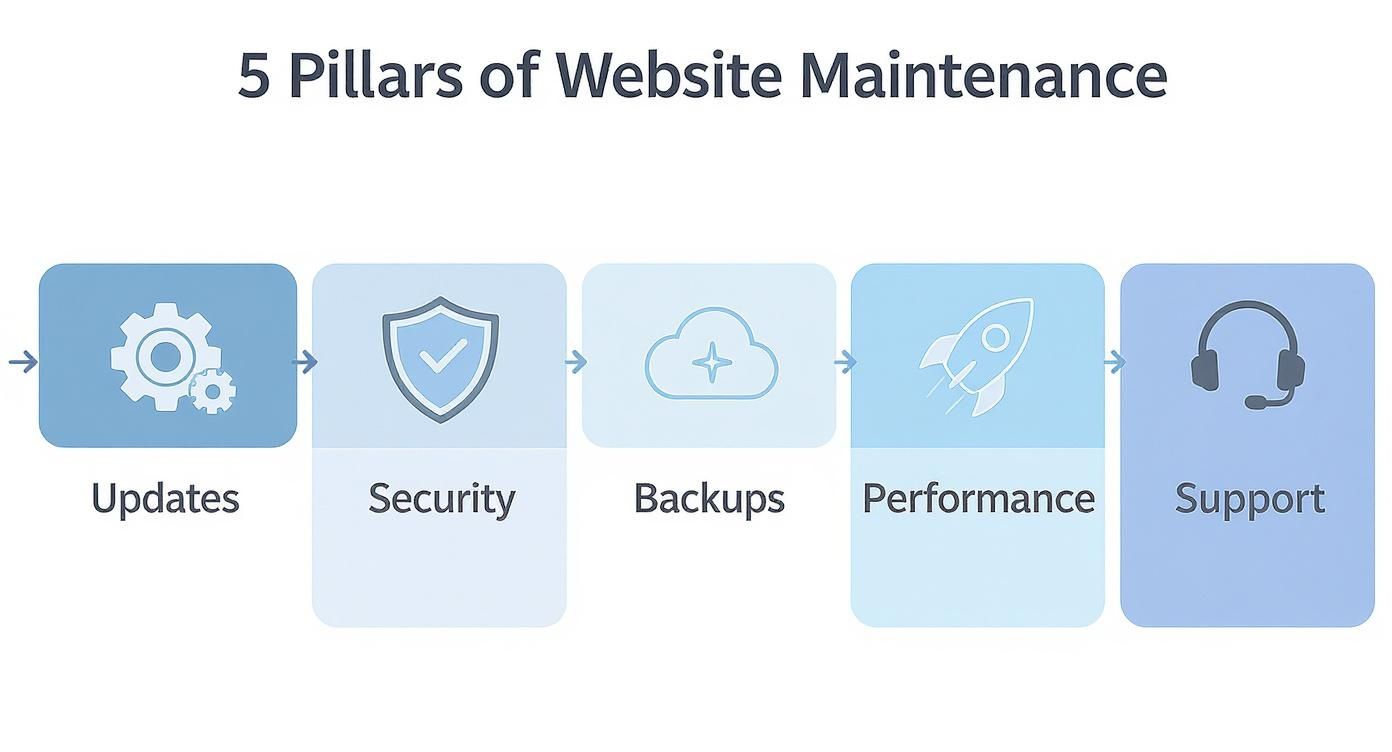
As you can see, a solid plan is a mix of proactive work, like keeping software updated and secure, and reactive help when you need it. This combination is what shapes the final cost.
Common Pricing Structures in Australia
When you start shopping around, you'll notice that most providers package their services in a few standard ways. Knowing the difference will help you avoid paying for things you don't need or, worse, getting caught without the support you do.
- Ad-Hoc Hourly Rates: This is your classic pay-as-you-go option. A developer logs their time, and you get a bill. It’s perfect for a one-off bug fix or a quick content update. The catch? It’s completely unpredictable. A real emergency can get very expensive, very fast. In Australia, expect hourly rates to fall anywhere between $80 and over $250, depending on who you hire.
- Monthly Retainers: This is the industry standard for a reason. You pay a set fee every month for a pre-agreed list of services – think regular updates, security scans, daily backups, and a certain number of support hours. It gives you a predictable budget and the peace of mind that someone is actively looking after your site.
- Tiered Packages: Many agencies offer their retainers in tiered packages, often labelled something like Basic, Business, or eCommerce. A basic plan might just cover the absolute essentials, while a premium tier will add in performance optimisation, more advanced security measures, and priority support. This setup lets you scale the service to match your site's needs.
Australian Website Maintenance Cost Comparison by Provider Type
Here’s where you’ll see the biggest difference in your quote. The type of provider you choose will have a massive impact on your final website maintenance cost. A solo freelancer working from a home office has completely different overheads than a digital agency with a team based in Sydney or Melbourne.
This table breaks down the typical providers in the Australian market to give you a clearer picture.
| Provider Type | Typical Monthly Cost (AUD) | Included Services | Best For |
|---|---|---|---|
| Solo Freelancer | $100 – $400 | Basic updates, backups, limited support hours. | Small blogs or simple brochure sites with low traffic and minimal business risk. |
| Specialised Agency | $250 – $1,500 | Platform-specific expertise (e.g., WordPress or Shopify), security, performance tuning, dedicated support. | Businesses whose websites are critical for revenue, including most eCommerce stores and lead-generation sites. |
| Full-Service Agency | $1,000 – $5,000+ | All technical maintenance plus SEO, content updates, marketing support, and strategic consulting. | Larger companies looking for a single partner to manage their entire digital presence. |
| In-House Team | $6,000 – $15,000+ | The salary of at least one full-time developer or IT specialist. | Enterprises with complex, custom-built platforms that require constant, dedicated attention. |
As the table shows, the costs are all over the map. The complexity of your website also plays a huge role. For example, a standard business site might need a comprehensive package costing around AUD 1,980 monthly. In contrast, a complex WooCommerce or Shopify store could easily require an annual maintenance budget of AUD 6,000 to AUD 24,000 just to keep the technical side running smoothly. If you're wondering what else to expect, our frequently asked questions section has some clear answers.
For most small to medium businesses, a specialised agency offers the best balance of cost and value. You get access to a team of experts with deep knowledge of your platform, proactive security, and reliable support without the enormous overhead of an in-house hire.
Ultimately, picking the right plan comes down to your appetite for risk and just how important your website is to your business. A simple portfolio website can probably get by on a basic plan, but a busy eCommerce store generating daily revenue needs a much more robust and responsive partnership to protect it.
What's Really Driving Up Your Website Maintenance Costs?
That neat monthly figure you see on a pricing page is often just the starting line. The true website maintenance cost is a moving target, influenced by a whole host of factors specific to your site. If you're not aware of them, you can easily get caught out by a much higher final bill.
Getting your head around these variables is the key to setting a budget that won’t give you any nasty surprises down the track.
Think of it like insuring a car. You wouldn't expect the premium for a sensible family sedan to be the same as a high-performance sports car, right? Your website works the same way. A simple brochure site is worlds away from a complex, multi-vendor eCommerce marketplace—they have completely different risk profiles and maintenance needs, and the price reflects that.
Your Website's Technology and Complexity
The platform your website is built on is easily the biggest factor in what you'll pay. If you have a completely custom-coded site, you'll need a developer with very specific knowledge of that codebase. That immediately makes maintenance more specialised and, you guessed it, more expensive than working with a common platform.
On the other hand, platforms like WordPress and Shopify have massive global communities, which makes finding a skilled wordpress developer australia or a Shopify expert much easier. But even within these popular systems, the complexity of your specific site is a huge variable.
- Number of Plugins/Apps: Every single plugin is another piece of software to keep updated, check for conflicts, and secure. A WordPress site juggling 50 plugins is a far bigger job to maintain than one with only 10.
- Custom Code: A standard Shopify theme is pretty straightforward. But a theme with custom Liquid code or a tangle of unique app integrations needs a developer who can confidently manage that bespoke setup.
- eCommerce Functionality: Running an online store is inherently more complex. You’re dealing with payment gateways, inventory systems, customer data security, and transaction logs—all of which need constant attention from a specialist.
The Role of Hosting and Infrastructure
Your hosting environment is another critical piece of the cost puzzle. It’s always tempting to go for the cheapest shared hosting plan you can find, but this is almost always a false economy. Cheap hosting often leads to slow load times, glaring security holes, and frustrating downtime—all problems your maintenance plan then has to work overtime to fix.
The initial build and hosting choices made by Australian businesses really set the scene for ongoing costs. For instance, a small business website might cost between AUD 5,000 and AUD 25,000 to build, whereas a sophisticated eCommerce platform can run anywhere from AUD 25,000 to over AUD 150,000. These upfront investments are a good indicator of the complexity that will dictate future maintenance bills.
When you factor in monthly hosting fees—from basic plans at AUD 20-100 to premium setups at AUD 100-300+—you can see how the total cost of ownership adds up. It's why many Australian businesses budget AUD 4,000 to over AUD 12,000 annually just for maintenance after launch. To get a better feel for local pricing, you can find more insights on these Australian website costs and budgeting trends on distl.com.au.
Service Level Agreements and How Much Support You Need
Finally, the level of support you need has a direct line to your monthly bill. A Service Level Agreement (SLA) is the formal contract that outlines exactly what your provider is responsible for and how quickly you can expect them to act. The more demanding your SLA, the higher the price tag.
An SLA that guarantees a 1-hour response time for a site-down emergency is a premium service. It means the provider has to have experts on standby, ready to drop everything to fix your problem. That level of readiness doesn't come cheap, but for a business that loses thousands of dollars for every hour of downtime, it’s a non-negotiable investment.
When you’re looking at a maintenance package, get into the nitty-gritty of the SLA. Does it cover you for after-hours emergencies? Are your support hours capped? Getting clarity on these points ensures you’re paying for the level of responsiveness your business actually needs.
How to Choose the Right Maintenance Partner

Choosing someone to look after your website is one of the most critical decisions you'll make for your business online. Think of it less like hiring a handyman and more like finding a trusted guardian for your most valuable digital asset. The goal isn't just to find the cheapest price; it's to find a partner who will proactively keep your site safe and running smoothly, not just react when things go wrong.
You have to look past the shiny sales pitch and get into the nitty-gritty of what they actually do. This due diligence is vital, whether you're a business owner needing to protect your online store or an agency looking for a reliable white label wordpress partner to service your clients. A cheap plan that vanishes when your site gets hacked isn't a bargain—it's a massive liability waiting to happen.
Evaluating Technical Expertise
First things first: technical skill. A generalist "webmaster" might be fine for simple tasks, but they often lack the deep, specialised knowledge needed for platforms like WordPress or Shopify. You need a partner whose expertise genuinely matches your tech stack.
Look for a team that lives and breathes your platform. A dedicated wordpress agency australia, for example, will have an intimate understanding of the platform's security vulnerabilities and performance bottlenecks. In the same way, a shopify expert australia will be a pro at navigating Liquid code, complex app integrations, and the fast-paced demands of eCommerce.
A partner's technical expertise is their core value. Don't settle for surface-level knowledge. A true expert anticipates problems you don't even see coming, saving you from the stress and expense of emergency fixes and lost revenue.
Communication and Security Protocols
World-class technical skills mean nothing if your partner is a ghost. Clear, consistent communication is non-negotiable. You should receive regular reports—written in plain English—that show you exactly what's been done, from plugin updates to security threats that were neutralised.
Security is another area where vague promises just don't cut it. "We keep your site secure" isn't an answer; it's a platitude. A professional provider will have concrete, documented procedures for everything, from how they handle a malware infection to the steps they take to secure the server environment.
Key Questions to Ask a Potential Partner
Before signing on the dotted line, come prepared with questions that cut through the fluff and reveal how a provider really operates. Their answers will tell you everything about their process and professionalism.
- What’s your exact process for a site-down emergency? This is a stress test of their responsiveness and shows you what their Service Level Agreement (SLA) looks like in the real world.
- How do you test updates before pushing them to my live site? The only right answer involves a staging or development environment. Anything else is playing with fire.
- Can you share some references or case studies? This lets you see concrete proof of their work and hear from other clients just like you.
- What exactly is and isn’t covered by my monthly support hours? This simple question draws a clear line between routine maintenance and new development, preventing surprise invoices down the track.
Asking these direct questions upfront is the best way to ensure you find a partner who will treat your website like the critical business asset it is—keeping it secure, fast, and profitable.
A Few Common Questions About Website Maintenance Costs
When it comes to budgeting for website maintenance, a few questions always seem to pop up. Let's tackle the most common ones we hear from businesses across Australia to clear the air and help you make a smart investment.
Can I Just Do the Maintenance Myself to Save a Bit of Cash?
It’s definitely tempting to think about going the DIY route to keep costs down, but for a business website, this can be a seriously risky move. Sure, you can probably handle basic content updates like changing text or uploading a new blog post. That's the easy part.
Real maintenance, however, involves the kind of technical, behind-the-scenes work that keeps a site secure and running smoothly. We're talking about security patching, scanning for malware, optimising server performance, and having a solid plan to get the site back online if something goes horribly wrong. The cost of a security breach or a site that's down for a day—in lost sales and reputation—is almost always far greater than the cost of a professional maintenance plan. DIY is fine for a personal blog, but not for an asset that makes you money.
Doesn't My Website Hosting Already Cover Maintenance?
This is probably the biggest point of confusion, and the short answer is: no, not really. Your hosting provider gives you the 'digital land' where your website's files live. That's their core job.
Some of the better 'managed' hosting plans might handle updates for the core platform (like WordPress itself), but they won't touch your specific theme, plugins, or custom code. Think of it like this: the landlord might maintain the apartment building, but they're not going to come in and fix your leaky tap or service your air conditioner. A dedicated maintenance plan is all about looking after your actual website—the 'house' itself.
How Often Does My Website Actually Need Maintenance?
For the vast majority of business websites, a monthly check-in is the absolute minimum. This gives your support team a regular window to update all your software, patch any new security holes, and take a fresh backup of everything.
A good rhythm looks something like this:
- Every Month: Run all core software, plugin, and theme updates. Perform a full-site backup and a thorough security scan.
- Every Quarter: Dive a bit deeper with performance checks, database clean-ups, and a review of who has access to the site.
Of course, if you're running a busy eCommerce site on Shopify or WooCommerce, the stakes are higher. For these, daily monitoring and even more frequent checks are essential to make sure a minor glitch doesn't turn into a major sales outage.
What's the Difference Between "Maintenance" and "New Development"?
Getting this clear from the start saves a lot of headaches and unexpected invoices down the track.
Maintenance is all about keeping what you already have working perfectly. It's proactive and protective—fixing bugs, updating software, and optimising speed. It’s about preserving the site's current state.
New development, on the other hand, is about adding something new. If you want to redesign a page, build a custom quote calculator, or connect a new payment system, you've crossed over into development territory. A well-drafted maintenance agreement should spell out this difference very clearly.
For agencies, offering top-notch maintenance is a must, but sinking time and money into building an in-house team is a huge drain. White Label WordPress offers expert, scalable white label support for WordPress and Shopify sites. You can provide premium maintenance services under your own brand, with profit margins you can count on.
Expand your agency's services and secure your profit margins today.