

For Australian agencies, the platform debate isn't about which is "better"—it's about picking the right tool for the job. So, let's cut to the chase: WordPress is your go-to for deep customisation, serious scalability, and building out white label partnerships. It’s the superior choice when you’re building unique, high-performance websites that need to grow with a client's business.
On the other hand, Squarespace shines when it comes to rapid deployment. It's the perfect all-in-one solution for clients with straightforward needs and tighter budgets.
WordPress vs Squarespace: An Executive Summary for Agencies
Choosing a web development platform is a foundational decision. It directly shapes your agency's profitability, workflow, and ultimately, your clients' satisfaction. While both WordPress and Squarespace are heavy hitters, they are built for fundamentally different agency models. This guide looks past the shiny features to analyse what really matters: client handoffs, long-term maintenance, and your bottom line.

Core Platform Philosophies
At its heart, WordPress is an open-source Content Management System (CMS). Think of it as a blank canvas. Its true power lies in its limitless extensibility, giving a wordpress developer australia complete creative and technical freedom. You can build anything from a simple brochure site to a sprawling e-commerce empire with bespoke integrations.
Squarespace, in contrast, is a Software-as-a-Service (SaaS) website builder. It’s an all-in-one package—hosting, security, and design tools all wrapped up in a closed ecosystem. This approach makes the creation process incredibly simple, but it also puts hard limits on custom functionality and design.
It's worth noting that in the Australian market, Squarespace holds a significant 19% market share among website builders, making it a serious player. Its appeal is rooted in user-friendly design tools that cater perfectly to our country's booming digital economy, where demand for quick-to-launch sites is high. You can explore more Squarespace statistics over at MageComp.com.
A Quick Comparison for Agencies
Before we get into the nitty-gritty, a high-level overview helps set the scene. The table below cuts through the noise to show you exactly how these platforms stack up from an agency's point of view, focusing on what impacts client work and your internal processes.
Platform Snapshot At a Glance
| Attribute | WordPress | Squarespace |
|---|---|---|
| Ideal Client | Businesses needing custom features, scalability, and specific integrations. | Small businesses, creatives, and startups with standard needs and a focus on aesthetics. |
| Customisation | Virtually limitless; full code access for themes and plugins. | Limited to template options, CSS overrides, and code injection. |
| Agency Model | Perfect for white label wordpress partnerships and full-service development. | Best for design-focused agencies offering quick, template-based solutions. |
| Maintenance | Requires ongoing updates, security monitoring, and backups (client or agency responsibility). | Handled entirely by Squarespace; minimal maintenance for the agency or client. |
| E-commerce | Highly scalable via WooCommerce, allowing for complex product catalogues and custom checkouts. | Built-in, user-friendly commerce features, but with less flexibility for unique requirements. |
This snapshot gives you a quick frame of reference. Now, we'll dive deeper into how these differences play out in the real world of agency life, from initial build to long-term client relationships.
Unpacking Customisation and Technical Freedom
When agencies weigh up WordPress versus Squarespace, the customisation debate really comes down to control versus convenience. Are you looking for a perfectly curated toolkit, or do you need the entire workshop? WordPress is the workshop, giving a custom wordpress development australia agency the raw power to solve just about any client problem you can throw at it.
That power comes directly from its open-source foundation. With WordPress, your developers have full access to the core code, theme files, and the database. This means you can build whatever a client needs, whether it's a completely bespoke theme that nails their brand identity or a complex plugin to integrate with a niche Australian CRM. The sky really is the limit.

WordPress: The Architect's Blueprint
Working with WordPress is less about building a website and more about architecting a digital solution from the ground up. This level of control is crucial when a client's requirements simply don't fit into a pre-made box.
Think about a real-world project: an Australian tourism operator needs their site to integrate with a specific local booking system's API to show real-time availability. On WordPress, a good developer can write a custom plugin to make this happen flawlessly. This is the kind of deep, functional customisation that makes agencies offering wordpress website design australia services choose it for their more complex builds.
WordPress’s open architecture isn't just a feature; it's a business asset. It lets your agency say "yes" to complex client requests that are simply non-starters on a closed platform like Squarespace.
You can see this reflected in its market dominance. WordPress commands a staggering 62.8% share of the CMS market in Australia, making it the go-to for scalable, custom sites. This massive footprint means it powers the lion's share of top Australian websites, leaving competitors far behind. You can dig deeper into these WordPress market share insights to see the full picture.
Squarespace: The Polished but Gated Community
Squarespace is built on a totally different philosophy. It offers a beautifully polished, secure, and easy-to-use environment, but it’s a closed ecosystem. It's like a stunning, gated community where you're allowed to rearrange the furniture but you're definitely not allowed to build an extension.
Customisation on Squarespace is mostly about what you can do in the visual editor and with CSS overrides. A skilled designer can certainly create a unique look within these boundaries, but you can't touch the platform's core functions. For agencies, this is where you hit a hard wall.
For instance, what if a client wants to modify their checkout process to add a custom validation step? Or what if they need to integrate a third-party inventory system that isn’t on Squarespace’s approved list? The answer, unfortunately, is a straightforward "no." The platform’s architecture just doesn't allow for that depth of modification.
The Practical Implications for Agencies
This fundamental difference in technical freedom has a direct impact on your agency’s service offerings and, ultimately, its profitability.
- WordPress: Lets you take on high-margin, bespoke development projects. Your agency can bring on a wordpress expert australia or partner with a white label provider to deliver sophisticated solutions, broadening your services and attracting higher-value clients.
- Squarespace: Is perfect for rapid, design-led projects where the scope is well-defined. The built-in constraints cut down on development time, but they also put a ceiling on the potential for custom, high-value work.
In the end, the choice comes down to your agency's business model. If you position yourself as a technical partner solving unique business challenges, WordPress gives you the tools you need. If your focus is on delivering beautiful designs quickly for clients with more standard requirements, Squarespace provides an efficient and elegant solution.
Comparing E-Commerce Capabilities for Australian Retailers
For any Aussie agency building an online store, choosing the right platform isn't just a tech decision—it's the foundation of the client's entire business. And when it comes to WordPress versus Squarespace, the e-commerce debate is where you see the biggest daylight between them. The choice really boils down to whether a client needs the bespoke, scalable power of WooCommerce or the curated simplicity of Squarespace Commerce.
Australian retailers have a unique set of non-negotiables. You absolutely need to integrate with local payment gateways like Afterpay, Zip, and POLi. You also need to connect with carriers like Australia Post or Sendle for live shipping rates. Both platforms have answers, but they get there in very different ways.

WooCommerce: The Engine for Custom Retail
Think of WooCommerce less as a plugin and more as a powerful framework. Because it’s open-source, an experienced woocommerce developer australia can build almost any retail experience you can dream up. This is absolutely essential for clients with complicated product catalogues, unique discount rules, or the need to sync inventory between a physical shop and their online store.
Imagine a client with storefronts in Melbourne and Sydney. They need a system that handles stock levels in real-time across both locations to avoid overselling. With WooCommerce, your agency can build a custom solution that plugs directly into their Point of Sale (POS) system. That's the kind of deep, business-critical integration where WooCommerce shines.
The real power of WooCommerce is its limitless potential. Agencies can craft completely custom checkout flows, build unique subscription models, and integrate with any third-party logistics (3PL) provider—offering tailored solutions that Squarespace just can’t touch.
Squarespace Commerce: The Curated Boutique Experience
Squarespace Commerce, on the other hand, delivers a polished, user-friendly experience straight out of the box. For small businesses, artists, or consultants with a straightforward product lineup, its simplicity is a huge plus. It handles the essentials—product pages, cart, checkout, and payments—with real elegance.
But that simplicity means sacrificing control. While Squarespace supports major players like Stripe and PayPal (which have Afterpay), integrating with smaller Aussie payment services can be a challenge, if not impossible. The checkout process is also locked down; you can’t add custom fields or change the flow beyond the standard options. For a client with very specific business needs, this can be a deal-breaker.
A Head-to-Head Comparison for Australian Agencies
To make the best call for your client, you need to look at the features that directly impact Aussie retailers.
| Feature | WooCommerce on WordPress | Squarespace Commerce |
|---|---|---|
| Product Complexity | Handles thousands of products, complex variations, and custom product types with ease. | Best for simpler catalogues. Limited options for complex product rules or custom fields. |
| Local Payment Gateways | Extensive. Dedicated plugins for Afterpay, Zip, POLi, and other Australian gateways. | Limited. Relies on what Stripe and PayPal offer, which covers major players but not all. |
| Shipping & Logistics | Highly flexible. Direct integrations with Australia Post, Sendle, and any 3PL via APIs. | Built-in integrations with major carriers, but custom logic or local couriers are difficult. |
| Checkout Customisation | Fully customisable. Add custom fields, multi-step checkouts, or unique validation rules. | Locked down. Minimal changes can be made to the standard checkout flow. |
| Scalability | Built to handle massive traffic and huge order volumes with the right hosting. | Good for small to medium volumes but can struggle under enterprise-level load. |
In the end, working with a woocommerce development australia agency gives you the raw power to build a tailored retail machine. Squarespace offers a turnkey solution that's perfect for simpler, more straightforward stores. For agencies also exploring other avenues, it’s worth checking out opportunities with white label Shopify development, which brings its own unique strengths to the e-commerce table.
Evaluating SEO Performance and Marketing Integration
When we talk about SEO, the difference between WordPress and Squarespace isn't about whether you can do it, but just how far you can take it. For agencies that need to give their clients a real competitive edge, that distinction is absolutely crucial. SEO is so much more than just sticking in a few keywords; it’s about technical precision, having granular control, and making sure everything ties neatly into your broader marketing efforts.
Squarespace gives you a perfectly competent, built-in SEO toolset that handles the basics really well. Things like sitemaps, clean URLs, and simple metadata are all sorted straight out of the box, which is a great starting point for clients with straightforward needs. The catch for an agency, however, is that this built-in simplicity is also its biggest weakness.
You're essentially working in a closed garden. It's a reliable foundation, for sure, but it puts a hard ceiling on what you can actually achieve in terms of advanced optimisation.
WordPress: The Technical SEO Powerhouse
This is where WordPress really pulls away. Thanks to its open-source nature and an incredible ecosystem of plugins, you get the kind of fine-tuned control that data-driven agencies thrive on. With tools like Rank Math or Yoast SEO, you graduate from basic optimisation to what feels like surgical precision.
This depth of control means a wordpress agency australia can roll out sophisticated strategies that are simply off the table with Squarespace. You can dial in every single aspect of a site’s technical health.
- Advanced Schema Markup: Go beyond the basics and implement custom schema for specific niches (like
LocalBusinessorMedicalOrganization) to give search engines richer context and improve visibility. - Granular Redirects: Manage complex redirect rules right at the server level—an absolute must-have during tricky site migrations or when overhauling content architecture.
- Log File Analysis: Get under the hood and analyse server logs to see exactly how search engine bots are crawling a site, letting you spot inefficiencies and find new opportunities.
For an agency, WordPress turns SEO from a simple checklist into a strategic weapon. The power to control every technical detail—from URL structures to intricate schema—is what sets you apart in a crowded market.
Integrating Marketing and Analytics Tools
Beyond just on-page SEO, a platform's true value is tested by how seamlessly it connects with the rest of the marketing world. Here again, WordPress’s open architecture gives it a massive head start.
Let’s say you have an Australian client with a dozen retail stores. A proper local SEO strategy would involve dynamically creating location-specific landing pages, pulling in feeds from a local reviews platform, and tracking conversions through Google Tag Manager with custom event triggers. This kind of complex setup is a standard project for a wordpress development australia team but would be a serious headache, if not impossible, on Squarespace.
WordPress allows for deep, direct integrations with just about any marketing automation platform, CRM, or analytics tool you can think of. You can hook up HubSpot, Salesforce, or Marketo without being forced to rely on limited connectors. This means your data flows cleanly, letting you build out comprehensive marketing funnels that show real, measurable results for your clients.
While Squarespace does offer integrations, it often leans on intermediary tools like Zapier, which can add unnecessary complexity and more potential points of failure. When it comes down to the WordPress vs Squarespace debate for agencies, this fundamental difference in flexibility is often the deciding factor.
Mastering Agency Workflows and White Label Opportunities
Choosing between WordPress and Squarespace goes way beyond the technical build. It actually shapes your agency's entire operational model, how profitable you can be, and your ability to grow. The platform you commit to will define how you manage projects, hand off sites to clients, and structure your long-term support. For Australian agencies trying to scale, this decision is a big one.
WordPress, being open-source, is practically built for collaborative workflows where different specialists can contribute. It’s a platform where designers, developers, and SEO experts can all work together seamlessly. This very structure is what makes it so perfect for a white label model.
The Power of White Label WordPress for Australian Agencies
The white label model is a powerful way for your agency to offer complex, high-margin services without the massive overhead of an in-house development team. You can stick to what you do best—client strategy, design, marketing—and let a specialist partner handle the tricky technical stuff.
This kind of partnership is a genuine game-changer when it comes to scalability. Say a client asks for a feature beyond your team's current skills, like a custom API integration or a complex e-commerce setup. You don't have to say no. Instead, you can outsource wordpress development australia to a trusted partner who does the work completely under your brand.
This approach gives you a few key strategic advantages:
- Guaranteed Profit Margins: Your white label partner gives you a fixed cost for the project. This means you can set your client pricing with a clear, predictable profit margin locked in from the start.
- Instant Service Expansion: You can immediately start offering advanced services like custom WordPress development or ongoing WordPress maintenance, which helps attract higher-value clients.
- Reduced Overhead: You completely sidestep the costs and headaches of hiring, training, and managing a full-time development team.
For an agency, white labelling WordPress development is a strategic multiplier. It unlocks access to a deeper talent pool, allowing you to confidently take on ambitious projects that would otherwise be out of reach, all while keeping your brand front and centre.
Squarespace and the Client Handoff Model
Squarespace runs on a totally different workflow philosophy. Because it's a closed, all-in-one system, true white label wordpress development is pretty much impossible. You can't just hand off backend coding to a specialist partner because there’s no real backend for them to access.
Instead, the Squarespace workflow is built for a clean and simple client handoff. The process is usually straightforward: your agency designs the site, adds the initial content, and then transfers ownership to the client. Since Squarespace bundles hosting, security, and updates into its subscription, there’s very little long-term maintenance for you or the client to worry about.
This model is ideal for agencies that focus on rapid, design-led projects for clients who want to manage their own sites with zero technical hassle. Its simplicity is its greatest strength, but it's also its main limitation. It just doesn't support the kind of scalable, partnership-driven growth you get with a white label WordPress model.
Comparing Long-Term Maintenance and Support
The final piece of this workflow puzzle is ongoing support. Looking at WordPress vs Squarespace here really highlights two very different approaches to long-term client relationships.
-
WordPress (Proactive Management): A WordPress site needs constant, proactive maintenance. We're talking regular updates to the core software, themes, and plugins, plus security monitoring and performance checks. This isn't a downside; it's a business opportunity. It creates a recurring revenue stream for agencies that offer wordpress website support australia retainers.
-
Squarespace (Hands-Off Management): With Squarespace, all the platform-level updates and security are handled behind the scenes. For clients, this is a huge plus. For agencies, it means your post-launch revenue is mostly limited to content updates or design tweaks, not steady technical maintenance retainers.
Making the Right Call for Your Agency and Your Clients
The whole WordPress vs. Squarespace debate isn't about which one is "better" in a vacuum. It's about making a smart, strategic decision that fits your agency's business model and, more importantly, your client's actual goals. The right choice always comes down to a realistic assessment of what the client needs versus what your agency can deliver, whether you're building in-house or working with a partner.
To make this a bit clearer, think of it as a decision tree. It helps you map out the best path based on your agency's core services and development resources.
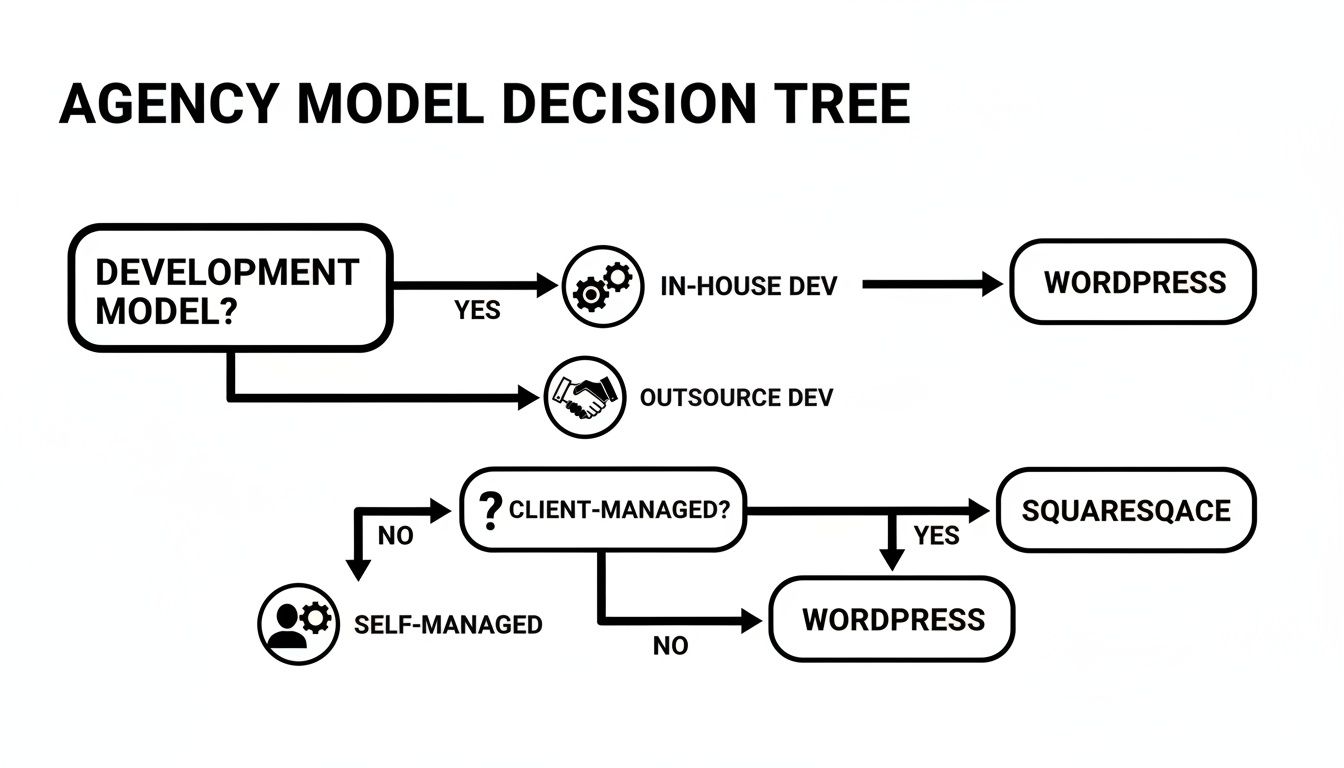
This visual really gets to the heart of it. If a project demands custom development—whether you handle it or outsource it—you're almost certainly heading down the WordPress path. On the other hand, if the end goal is for the client to take the reins and manage the site themselves, Squarespace and its straightforward interface is often the perfect fit.
When to Choose Which Platform
Ditching the one-size-fits-all mindset is crucial here. Let these real-world scenarios guide your discovery calls and proposals, helping you steer clients toward the platform that will actually serve them best.
Squarespace is the Go-To When…
You should lean towards Squarespace when your client fits this kind of profile:
- They're a creative, a consultant, or a small local business like a photographer or a new cafe.
- The main objective is to get a visually polished, portfolio-style website live—fast.
- Their feature needs are pretty standard (think contact forms, galleries, a simple blog) and aren't likely to get complicated down the track.
- The client’s top priorities are beautiful design and the ability to easily update things themselves.
In these situations, Squarespace delivers an elegant, all-in-one package. It keeps the technical headaches to a minimum for both your agency and your client, letting you focus on design and strategy.
Ultimately, the right choice is all about balance. You have to match the client's immediate needs and their long-term vision with your agency's capacity to deliver the required customisation and ongoing support.
WordPress is the Strategic Choice When…
WordPress becomes the obvious and more powerful choice for more ambitious projects:
- The client is a growing e-commerce store or a B2B company that needs to integrate with other business systems (like a CRM or marketing automation tool).
- Advanced SEO, serious content marketing, and long-term scalability are non-negotiable.
- The project involves custom-built features, like API integrations, unique membership areas, or complex user workflows.
- Your agency either offers ongoing WordPress maintenance australia or is looking to scale its development services through partnerships.
For these kinds of clients, WordPress provides the raw power and flexibility needed to build a genuine business asset. If you're an agency wondering how this plays out in the real world, this detailed white label WordPress case study shows the direct benefits of teaming up with expert developers. The platform’s open-source nature means the website can adapt to virtually any future business need, making it a wise investment for growth-focused clients and a highly profitable service for your agency.
To help simplify this even further, here's a quick-reference table to guide your decision-making process for different client projects.
Use Case Decision Matrix
| Client Need / Scenario | Recommended Platform | Reasoning |
|---|---|---|
| Local restaurant needing an online menu and contact info | Squarespace | Fast to launch, visually appealing, and easy for the owner to update specials. |
| E-commerce brand with 500+ products and inventory sync | WordPress (with WooCommerce) | Unmatched scalability for product catalogues, payment gateways, and integrations. |
| A freelance photographer's online portfolio | Squarespace | Best-in-class templates for visual-heavy sites and simple client management. |
| A corporate site requiring multi-language support and a partner portal | WordPress | Superior flexibility for complex functionality, user roles, and third-party integrations. |
| A startup's initial MVP website on a tight budget | Squarespace | All-in-one hosting and design tools reduce initial setup costs and complexity. |
| A B2B company focused on lead generation via content marketing | WordPress | Powerful SEO plugins and content management capabilities give it the edge for growth. |
This matrix isn't exhaustive, but it highlights the core principle: the platform must match the project's complexity and the client's long-term ambitions.
Frequently Asked Questions
When Australian agencies are deciding between WordPress and Squarespace, the same crucial questions always seem to surface. These aren't just about tech specs; they're business decisions that directly impact your agency's bottom line, client satisfaction, and how smoothly your projects run.
Let's get straight to the answers you need.
Is WordPress More Expensive Than Squarespace in the Long Run?
At first glance, a basic Squarespace plan might look pricier than cheap WordPress hosting. But that initial price tag for WordPress is misleading. The true cost emerges when you add premium themes, essential plugins (think security, backups, SEO), and the ongoing need for wordpress maintenance australia.
Once you tally up all those recurring costs, a professionally managed, secure WordPress site almost always carries a higher total cost of ownership.
The real cost isn't just the sticker price; it's the investment in time and expertise. Squarespace offers predictable, fixed costs. A WordPress site's cost, on the other hand, scales with its complexity and security requirements.
For your agency, this boils down to a strategic choice: do you prefer the simple subscription model of Squarespace, or the recurring revenue opportunity that comes with offering WordPress maintenance retainers?
Who Is Responsible for Security and Backups?
This is a massive point of difference and one that directly affects your agency's liability and how you hand over a project to a client.
- Squarespace: As a fully-hosted platform, Squarespace takes care of all server-side security, software updates, and backups. The responsibility is theirs, which gives you and your client peace of mind. Your main task is simply to advise on strong user passwords.
- WordPress: Security is very much a shared responsibility. Your hosting provider handles the server, but it's up to you (or your client) to keep the WordPress core, themes, and plugins updated. This isn't optional; it's vital for patching vulnerabilities.
Dropping the ball on WordPress security can lead to serious headaches, which is precisely why so many agencies build wordpress website support australia into their core services.
Which Platform Is Better for a Client Who Wants to Manage Their Own Site?
If your client isn't technically-minded but wants to confidently manage their own content, Squarespace is generally the easier option. Its visual, drag-and-drop editor is incredibly intuitive. Clients can update text, swap out images, and even add new pages without feeling like they might break something.
WordPress is a powerhouse, but it comes with a steeper learning curve. The dashboard alone, with its separation between the backend and what the user sees, can be confusing for a novice. While page builders like Elementor have made editing much simpler, the fundamental need for regular maintenance never goes away.
A client taking over their own WordPress site has to be committed to running those updates to keep it secure and working properly.
Ready to expand your service offerings without the overhead? White Label WordPress provides expert, brandable development solutions for Australian agencies. Let us handle the technical build so you can focus on your clients. Explore our white label partnerships today.